


CliffsNotes
Questions like “How to choose email archiving software” rarely feel urgent, until they suddenly are.
A regulator asks for records. Legal needs to reconstruct a decision. Leadership wants answers fast, with full context. Then the gaps rear their ugly heads.
What looked like a straightforward storage decision turns into something else entirely. Questions about whether emails were fully captured, whether searches can be trusted, and whether results can be defended under scrutiny…
This guide walks through the questions that surface those gaps early, before you’re forced to rely on the system under pressure. That’s ultimately what separates the best email archiving platforms for business from the rest.
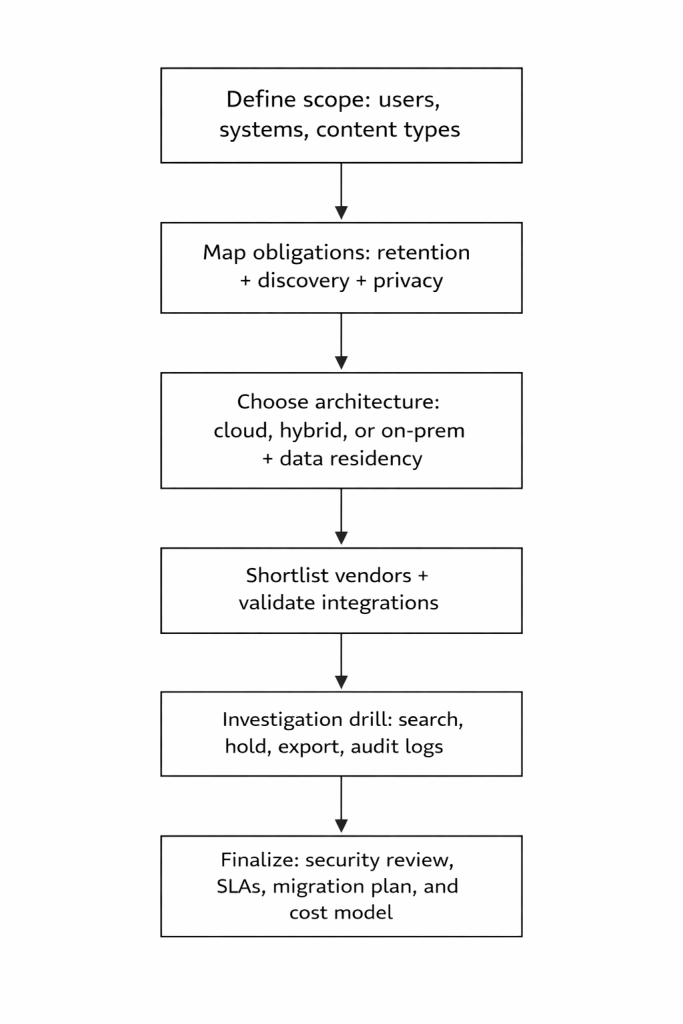
Decision process map
Below is a practical flow for choosing email archiving software.
The questions that matter when your data’s on the line
Start here to see where platforms actually hold up, or don’t.
1. What email archiving compliance requirements apply to us, and what proof do they expect?
Requirements may include preserving certain records in a non-rewriteable/non-erasable format under U.S. Securities and Exchange Commission (SEC) Rule 17a-4, documenting and retaining required Health Insurance Portability and Accountability Act (HIPAA) policies for set periods, and applying privacy storage limitations under General Data Protection Regulation (GDPR).
What to look for
A written retention schedule and a mapped list of required controls (immutability, indexing, audit logs, exports).
2. How does the platform capture email, and can we test capture completeness?
Capture method isn’t just a technical detail. It directly affects what ends up in your archive, and what doesn’t.
This becomes especially relevant when evaluating email archiving for Microsoft 365 or email archiving for Google Workspace, where capture methods differ based on how each platform exposes data and handles routing.
Some approaches capture messages as they pass through the mail system, which tends to preserve a complete, tamper-resistant record. Others rely on APIs or mailbox access, which can add context and flexibility but may depend on platform limits, timing, or permissions.
Those differences shape what you can retrieve later, how defensible your records are, and whether gaps only show up during an investigation.
What to look for
Capture method (journaling, API, gateway) plus reconciliation reporting that flags gaps.
3. How does email archive search and eDiscovery work, and can we reproduce results on a time crunch?
When answers are needed STAT, search has to be consistent, explainable, and complete. Your team should be able to run the same query twice and arrive at the same result, with a clear record of how that result was produced.
Differences in how platforms index content and metadata affect what gets returned, how complete those results are, and whether conversations can be reconstructed reliably.
What to look for
Search operators and filters, conversation reconstruction, and clarity on what metadata is indexed and preserved.
4. Can we manage retention policies and legal holds together without conflicts?
Retention and legal hold operate on different timelines, and how a platform handles that overlap determines whether data is preserved or deleted at exactly the wrong moment.
Legal hold email archiving tools tend to split into distinct branches at this point, since the interaction between retention and hold is where conflicts surface first.
Retention rules define how long data is kept. Legal holds step in when something needs to be preserved beyond those timelines, often indefinitely. In many systems, holds take precedence and prevent deletion until they are explicitly removed.
If that interaction isn’t clear or predictable, teams can end up with unexpected data loss or over-retention that creates risk elsewhere.
What to look for
Scoped holds (custodian, date range, query), hold audit trails, and documented “hold vs retention” behavior.
5. What is the storage and cost model, including investigation costs?
Pricing shapes how the platform behaves over time, not just what you pay upfront.
Vendors typically price around users or storage, but variations exist:
- Storage-based tiers
- Subscription vs one-time licensing
- Hybrid models that combine infrastructure and cloud fees
On top of that, some platforms layer in add-ons. Advanced search, analytics, integrations, or even additional security features may sit behind higher tiers or bundled packages that can’t be separated. That can push teams into paying for capabilities they don’t need, or delay access to ones they do.
Those choices affect long-term cost, especially when investigations require exporting data, scaling storage, or unlocking features midstream.
What to look for
Per-user vs storage pricing, bundled vs modular features, investigation-related costs (search, export, eDiscovery), and clarity on how pricing scales.
6. What immutability and audit-trail controls exist for tamper resistance?
Immutability and audit trails determine whether regulators can trust your records under scrutiny.
Regulators don’t just expect records to exist. They expect proof that those records haven’t been altered, deleted, or selectively edited after the fact. That’s why standards like SEC Rule 17a-4 require either non-rewriteable, non-erasable storage or a complete audit trail that captures every change and allows for reconstruction of the original record.
This posture makes for classic defensibility. Without it, you can retrieve an email, but you can’t prove it’s the same email that existed at the time of its creation.
What to look for
Immutable storage (Write Once, Read Many [WORM] or equivalent), preservation locks, full audit trails of all actions, and the ability to verify record integrity over time.
7. Where will archived data live, and what does that mean for data sovereignty?
Where your data lives determines which laws apply to it, and who can legally access it.
Data residency affects not just storage, but also processing, backups, and support access. U.S. organizations often need to account for frameworks like HIPAA, FedRAMP, or ITAR, alongside federal laws like the CLOUD Act, which can grant U.S. authorities access to data held by U.S.-based providers regardless of location.
International obligations such as GDPR also introduce restrictions on cross-border transfers, with mechanisms like Standard Contractual Clauses used to legitimize those flows.
These overlapping rules shape architecture decisions, vendor selection, and even where investigations can be performed.
What to look for
Data residency options by region, subprocessor transparency, clarity on cross-border transfers, and how the provider handles sovereignty conflicts across jurisdictions.
8. How will the platform perform as email volume and custodians grow?
Archiving is a growth problem. Cloud computing is defined around rapid elasticity, but archives still have real limits around indexing, concurrent searches, and export throughput.
As volume increases, indexing constraints can lead to partially searchable data, while large, multi-custodian searches take longer and compete for shared system resources. Export limits and throughput caps can slow investigations, especially when datasets are large or queries need refinement under time pressure.
What to look for
Published availability/search service level agreements (SLAs), if offered, and performance testing in proof.
9. How is archived data protected end-to-end?
Baselines include encryption at rest and in transit, access control, and audit logging.
Beyond that, platforms diverge in how encryption is implemented and controlled. Some rely on provider-managed keys for simplicity and low overhead, while others support customer-managed keys, giving organizations control over key access, rotation, and revocation.
That choice affects who ultimately controls access to the data, how quickly access can be restricted in an incident, and how well the system aligns with stricter compliance or internal security requirements.
What to look for
Encryption and key management details, SSO/MFA support, and security logs usable by your Security Operations Center (SOC).
10. Who can access, restore, and export data, and can we prove chain of custody?
Access should support Legal and HR workflows without turning IT into a bottleneck, while maintaining auditability.
Clear role-based permissions determine who can view, place holds, restore, or export data, and every action should be logged with time, user, and scope. That record is what establishes chain of custody, allowing teams to show who accessed what, when, and how data moved from archive to production.
In regulated contexts, the ability to reconstruct that sequence is directly tied to whether evidence is considered reliable.
What to look for
Role-based access, delegation, read-only reviewer roles, controlled restores, and export audit trails.
11. What SLAs, support, and migration services are included in writing?
NIST cloud guidance highlights the need to review SLAs and service terms before adopting a platform. Vendors also publish migration prerequisites and tooling for legacy archives.
In practice, SLAs define response times, uptime expectations, and escalation paths when something breaks. Support scope varies widely, from basic ticketing to hands-on onboarding and troubleshooting.
Migration services matter just as much, since incomplete or poorly mapped imports can create gaps that only surface later during audits or investigations.
What to look for
Written SLAs, escalation timelines, migration runbooks, and tested export and exit terms.
12. What visibility do we have into archive health and policy coverage over time?
You need clear, ongoing clarity into how the archive is behaving over time. That includes whether retention policies are applied as expected, whether data is being captured without gaps, and whether system activity aligns with internal controls.
Strong reporting surfaces patterns, not just events. It helps teams spot policy coverage drift, identify inconsistencies across custodians or data sources, and confirm that the archive remains complete, current, and aligned with requirements as the organization changes.
What to look for
Audit reports for searches, views, exports, and admin actions; plus retention and hold dashboards.
Put these questions into practice
Reading a blog post is one thing. Pressure-testing vendors is where the real work begins. Here’s a solid place to start.
1. Compare Org IQ against the legacy players
If you’re cross-shopping Org IQ (hi, that’s us) with any of the most popular legacy players in the market, there’s a good chance we’ve already done the heavy lifting for you in a dedicated compare article.
The throughline across most of those? Org IQ goes beyond basic journaling and passive storage to actively surface actionable insights from email. And yes, exporting your data doesn’t require signing your soul away.
For a more detailed breakdown, including how each platform stacks up against the 12 questions above, you can explore the full compare library.
2. Use this email archiving vendor evaluation template
We’ve also put together a practical evaluation template to help teams run structured comparisons without losing track of what matters.
Use it to:
- Score vendors consistently across the same criteria
- Track capture, search, and retention behavior side by side
- Document gaps, risks, and follow-up questions as they surface
- Align IT, Legal, and leadership on a shared evaluation framework
- Create a defensible record of how the final decision was made
It’s simple, structured, and built to keep evaluations grounded in real-world performance.
A tl;dr vendor-selection framework
Use the same investigation drill and success criteria for every vendor, and don’t negotiate final pricing until the vendor has passed the drill and your legal and security teams have approved the written SLA and exit terms.
Frequently Asked Questions
1. How do I choose the right email archiver for my business?
Focus on capture completeness, search reliability, compliance support, and cost structure. The right platform consistently captures all email data, enables fast, defensible retrieval, and scales without introducing gaps or operational bottlenecks.
2. What should I look for in an email archiving platform comparison?
Compare how vendors handle capture, search, legal hold, and exports under real conditions. Platforms like Org IQ go further by layering analytics on top of archived data, helping teams surface patterns and risks, not just store emails.
3. Which email archiving solutions support legal hold and eDiscovery workflows?
Effective email retention and archiving solutions preserve emails in immutable storage, allow targeted legal holds, and enable fast search and export. Legal hold ensures relevant data is retained without alteration during investigations or litigation.
4. What are the differences between journaling, API, and gateway-based email archiving?
Journaling captures emails in transit for completeness, APIs provide flexible access to mailbox data, and gateways filter traffic before delivery. These differences impact data integrity, metadata capture, and how reliable the archive is during investigations.]
5. What’s the difference between email backup and email archiving?
Backup supports recovery after data loss, while archiving preserves emails long-term in searchable, immutable storage for compliance, audits, and investigations. Archiving is designed for governance, not just restoration.


