The Org IQ logo

Posts By: Greg Fulk

Why HR Teams Discover Employee Issues Too Late (And How Early Signals Help)

A resignation letter lands in HR’s inbox. “Sandy? Oh no! How didn’t we see this coming?” Well, in many cases, you actually could’ve.

Sandy may have stopped speaking up, started sending messages late at night, or raised the same concern more than once without a clear resolution. Those canaries in the coal mine were very much present and visible, just scattered across everyday communication, so they never became an HR case until this model employee started saying her goodbyes.

Gallup found that around 4 in 10 voluntary leavers didn’t speak to anyone before deciding to resign, while about half believed something could’ve been done to prevent their departure.

This article examines that gap: why HR systems tend to capture formal outcomes rather than early signals, which communication patterns deserve a closer look, and how HR can investigate them without conflating a signal for proof. 


Why HR Gets Stuck Being the Last to Find Out

HR risk detection lags behind as it usually relies on a reporting system built around formal events that come way downstream of their actual causes.

Employees route around formal channels

People often don’t report a problem to the department responsible for handling it. Instead, they’ll tell a trusted coworker, vent privately, change how they communicate, or just call it quits.

An EEOC task force found that roughly three out of four people who experienced workplace harassment never discussed it with a supervisor, manager, or union representative. Fear of disbelief, inaction, blame, and retaliation were among the reasons.

So the average complaint log only shows the few reports HR received, not the plethora of problems employees experienced. And even the formal complaints that do make the log are likely old news to everyone in the office.

A piece does not a puzzle make

One manager sees a tense email. Payroll sees an attendance change. A project lead sees missed handoffs. A coworker hears frustration. HR may see none of it unless someone identifies the pattern.

The same fragmentation applies to the tools People Analytics teams find themselves saddled with. In one relatable example, a practitioner described extracting data from HR systems as “the trickiest part” of the job. They had to flatten tedious SOAP XML files and rebuild the stack around Snowflake and dbt if they had any hope of owning their data model rather than remaining trapped inside a vendor’s poor interface. 

When historical data is that difficult to retrieve and compare, it’s no wonder HR is only clued in after the entire office has been living through it.

Traditional HR inputs arrive late, scattered, and filtered

Engagement surveys take snapshots. Exit interviews happen after a decision. Case-management systems begin when someone reports an issue. Performance reviews summarize what was already visible in daily work. 

And even those snapshots come through a filter. 

A survey, for example, captures what employees remember, how they interpret the question, and what they feel safe putting on record. So that suspiciously sunny engagement score may mean everything’s fine… OR that nobody wanted their “anonymous” comment becoming the subject of Thursday’s all-hands. 

That doesn’t make self-reported metrics useless. Far from it. Employees remain the best source on whether they feel supported, heard, or overworked. But survey results reflect what people were willing and able to say when asked, not a live feed of organizational health.

CIPD recommends combining subjective and objective measures because they capture different dimensions, and both have limitations when used alone. To that end, an HR analytics platform can shorten common delays by comparing self-reports with HRIS records, absence data, formal complaints, manager notes, and communication patterns. 

A weak score is easy to dismiss. The same score appearing alongside late-night activity, slower responses, and unresolved exchanges gives HR a much better reason to look closer.

The monetary cost of HR having all the dots but never joining them

People managers often point to a lack of data when people issues surface too late. The cases below reveal the more uncomfortable possibility: an org can have all the warning signs in the world, yet stay in the dark until the damage lands on the balance sheet.

At Wells Fargo, HR touched practically every part of the sales-pressure problem, from terminations and discipline to incentive pay, turnover, morale, and litigation. But the bank’s own investigation found no coordinated HR effort to track or size the pattern. 

Roughly 1% of the Community Bank workforce was being fired each year for sales-integrity violations, a figure leaders took as reassurance that the other 99% were behaving. And positive employee surveys helped perpetuate that rosy view. 

The board only learned in 2016 that approximately 5,300 employees had been wrongfully terminated. Wells Fargo later paid $3 billion to resolve criminal and civil investigations.

HMRC’s Respect at Work Review found this blind spot’s quieter cousin. Reports, survey findings, mediation requests, and local records existed, but no centralized dataset gave HR a trustworthy view across them. Some records conflicted, and nearly two-thirds of survey respondents who experienced bullying or harassment said they had never formally reported it.

While most businesses are unlikely to face a case that public or catastrophic, their losses are still significant: preventable departures and associated institutional knowledge drains, repeated conflict, burnout, legal review, and damaged trust.

Early warning signs in communication worth reviewing

Employee early warning signs work best in clusters. The occasional delayed reply or awkward phrasing proves little. A repeated change across several measures, though? Bring in the magnifying glass.

  1. Tone and sentiment drift. Team sentiment analysis can show whether communication has moved away from a person’s or team’s normal pattern. Sustained negativity, confusion, or emotional flattening may support a check-in when other indicators change too.
  2. Complaint clusters. Employee complaint signals may appear through repeated mentions of disrespect, workload, unfair treatment, retaliation, or the same manager. Workplace conflict detection becomes more useful when HR can see recurrence across time, teams, and threads.
  3. Response and ownership friction. Slower replies, repeated follow-ups, unresolved requests, and unclear handoffs often indicate overload, avoidance, role confusion, or strained working relationships.
  4. Communication withdrawal. A peer-reviewed study of 866 managers found changes in email-network position and language among those who later left, with some shifts appearing about five months before departure. These patterns can add useful context to employee retention analytics, especially when reviewed alongside survey, absence, and turnover data.
  5. Abnormal workload patterns. After-hours surges, high message volume, long response delays, or one employee becoming a single point of contact can flag staffing, workload, or continuity concerns.

These workforce risk indicators tell you where to look. But how can HR distinguish a nothingburger from a pattern worth investigating?

How HR separates a one-off from a meaningful pattern

An innocuous occurrence usually fades under scrutiny. A meaningful pattern repeats, appears alongside other warning signs, or holds up when HR checks it against the surrounding context.

Here’s a simple workflow for making that distinction consistently.

Detect a recurring change rather than reacting to one message or even thread.Validate it against source context, HR records, manager input, and relevant policy.
Assign an HR owner who can review the situation fairly and promptly.Speak with the people involved before deciding what the pattern means.
Record the action taken, schedule follow-up, and check whether the issue repeats.

Treat every signal as a cue, not a conclusion

Employee behavior analytics can identify changes in volume, responsiveness, tone, and communication networks. They can’t reliably determine intent, truth, health status, misconduct, or future behavior.

NIST’s AI Risk Management Framework calls for defined human oversight and model output interpreted within its operating context. That matters in HR, where a false assumption can affect someone’s job and automated monitoring can raise discrimination concerns with the EEOC.

In a nutshell: don’t discipline, label, or rank an employee from any one signal alone. Use the signal to open a careful review and, where appropriate, a conversation.

What to look for in HR monitoring tools

Useful HR monitoring tools should help teams understand patterns without creating a black-box employee score. Look for:

  • Trends over time, with a clear baseline for the employee, team, or department.
  • Multiple signals in one view, such as sentiment, response time, volume, and repeated topics.
  • Searchable source context so HR can validate an alert before acting.
  • Role-based access, audit history, and limited visibility for sensitive reviews.
  • Custom tags or searches for known employee complaint signals and policy concerns.
  • Human review steps and documented escalation rules.
  • Reporting that tracks whether intervention reduced recurrence or improved follow-through.

A system that sends more alerts than HR can review simply moves the blind spot into a new queue.

Where Org IQ fits

Org IQ can fill the communication gap in a broader people analytics software stack.

Its activity graphs, heatmaps, Employee Focus Reports, sentiment analysis, tags, and searchable email context help HR compare signals over time and validate concerns before acting. And role-based access, audit histories, alerts, and immutable archiving support sensitive reviews without turning every anomaly into a verdict. 

Used alongside HRIS data, surveys, case management, and manager conversations, Org IQ can help HR spot patterns earlier while keeping interpretation and intervention firmly in human hands.

Earlier visibility gives HR more room to act

An issue unseen is an issue unsupported. 

Formal reporting will always matter, but it captures only what employees choose to disclose and what managers think to escalate. Early communication signals give HR another way in: spot recurring friction, check it against context, and check in before strain hardens into burnout, conflict, or resignation. 

The payoff? Better support, better timing, and fewer Sandys pulling the rug out from under us.

Frequently Asked Questions

What should HR look for in monitoring tools?

HR monitoring tools should show trends over time, combine multiple signals, preserve searchable source context, and support role-based access, audit histories, custom alerts, and human review. They should help HR investigate patterns rather than assign opaque employee risk scores or automate employment decisions. Transparency, necessity, employee consultation, and bias monitoring should also shape how the tool is deployed. 

How does employee sentiment analysis help HR spot issues earlier? 

Employee sentiment analysis tracks changes in communication tone over time, helping HR notice sustained morale dips, disengagement, or rising friction before they appear in a complaint, performance review, or resignation. Employee engagement analytics become more useful when survey responses can be compared with workload, responsiveness, and communication patterns. 

Can HR analytics software identify employee issues before they escalate? 

HR analytics software can surface recurring patterns such as sentiment drift, after-hours activity, slower responses, complaint clusters, absence changes, and rising turnover. These signals sharpen people risk management by helping HR narrow where to look and validate concerns sooner. The software can’t determine why a pattern changed or replace one-on-ones, policy review, and human judgment. 

How do people analytics tools complement an HRIS? 

An HRIS supplies employee records and standard workforce reporting. People analytics tools extend that foundation by combining HR data with surveys, absence records, business outcomes, and communication signals. This wider view helps HR compare what employees report with observable patterns, identify trends across systems, and measure whether an intervention improved the situation.

How can HR monitor workplace communication without invading employee privacy? 

HR should define a legitimate purpose, collect only relevant data, explain what is monitored and why, consult employees, limit access, audit usage, and require human review. Monitoring should focus on patterns and validated context rather than covert surveillance or automatic employee scoring. Because privacy and employment requirements vary by jurisdiction, organizations should complete the appropriate legal and data-protection review before deployment. 

What is people analytics?

People analytics is the analysis of workforce data to solve business and employee problems. It uses quantitative and qualitative information to understand outcomes such as morale, retention, performance, wellbeing, and workforce risk, then helps HR design and assess targeted action. People analytics is also referred to as HR analytics, talent analytics, or workforce analytics.
The Hidden Cost of Email-Driven Work Without Visibility or Intelligence

Since Work Flows Through Email, It’s Too Valuable to Ignore.

Too many organizations think of email as a communication tool. In reality, it’s more like an operational system.

Customer escalations arrive there first. Managers approve budgets and hiring requests there. Legal discussions unfold there. Vendors negotiate timelines there. Sales teams handle objections there. HR documents sensitive cases there. Even in organizations that use dedicated project management and collaboration tools, much of the context behind major business decisions still lives in email.

That makes email-driven work one of the most under-leveraged sources of operational intelligence available to leaders today.

And the problem isn’t even that businesses have too much email, as commonly assumed. It’s that they often treat those messages as a passive vault rather than an opportunity for unprecedented workflow visibility.

Emails are kept around for compliance, searched when someone remembers they exist, and otherwise left scattered across thousands of individual inboxes. Over time, that creates costly operational blind spots. Decisions become difficult to reconstruct. Ownership becomes unclear. Institutional knowledge quietly builds up inside conversations that no one can keep track of.

Meanwhile, Microsoft reports that the average employee receives 117 emails on the average workday, is interrupted roughly every two minutes by meetings, messages, or notifications, and regularly communicates outside normal working hours. That’s an enormous volume of workforce communication data flowing through a single channel every day.

Without a way to convert that information into actionable business email insights, organizations are forced to get by on intuition and anecdote instead of evidence.


The Hidden Operational Costs of Email Blind Spots

Like all things operations, it takes more than just a missed email to get the dominoes falling. Organizational debt accumulates gradually, as everyday communication becomes harder to track, decisions lose context, and work slows in ways that aren’t immediately visible. 

By the time the impact is obvious, the underlying issues have existed for months or even years.

Delays compound faster than leaders realize

Work moves at the speed of decisions.

When approvals, clarifications, and customer conversations stretch across multiple email threads, every additional handoff increases the chance that something slips through the cracks.

The American Productivity & Quality Center (APQC)’s study of 982 full-time knowledge workers helps put these seemingly innocuous delays into perspective. On average, respondents reported spending 3.6 hours each week managing internal workplace communication and another 2.8 hours looking for or requesting needed information, underscoring how communication friction quietly erodes productivity.

And on the ground, that might translate to:

  • Client-facing teams experiencing slower service recovery.
  • Operations teams spending more time coordinating than executing.
  • Legal and compliance teams wasting valuable hours searching for records that should have been immediately available.
  • Leadership noticing the outcome long before they understand the cause.

Institutional knowledge hides inside inboxes

We’ve all experienced the “tip-of-the-tongue” phenomenon, where you’re sure you know that word or important date but can’t recall it in the moment. 

Organizations face something similar daily. The difference is that instead of a forgotten lyric, it’s a customer commitment, an approval, or the reasoning behind a business decision that’s now under scrutiny.

Employees frequently need to find knowledge trapped in inboxes before responding to customers, reviewing contracts, onboarding colleagues, or making basic operational decisions.

Because the messages still exist, but the visibility just… doesn’t, which creates duplicate work throughout the organization.

This is one of those sneaky time drains that eat into a workweek faster than you can say “Eureka!”


Executive Visibility ≠ Surveilling Everyone’s Inbox

There’s one question that keeps surfacing whenever we bring up business communication visibility:

“Can we understand how work flows across the organization without turning into Big Brother?”

Yes, you absolutely can, as those goals aren’t mutually exclusive. Workplace communication visibility, when done right, isn’t about watching every single employee like a hawk.

Instead of reviewing isolated messages or zeroing in on out-of-context behaviors, leaders can identify recurring patterns.

  • Where’s the response-time drift?
  • Where do approvals consistently stall?
  • Which workflows depend heavily on one person?
  • Which customer issues repeatedly require escalation?
  • Which teams are consistently overloaded outside business hours?

Answering those questions requires organizational email analysis, not because leaders need to know the nitty-gritty of every conversation, but because recurring communication patterns reveal operational issues before traditional reporting does.

The objective is fewer surprises, not more oversight. Ultimately, this comes down to management. It’d be naive to assume every business will use communication analytics responsibly. But leaders interested in improving communication flow typically get far greater value from understanding organization-wide patterns than from examining individual contributors.


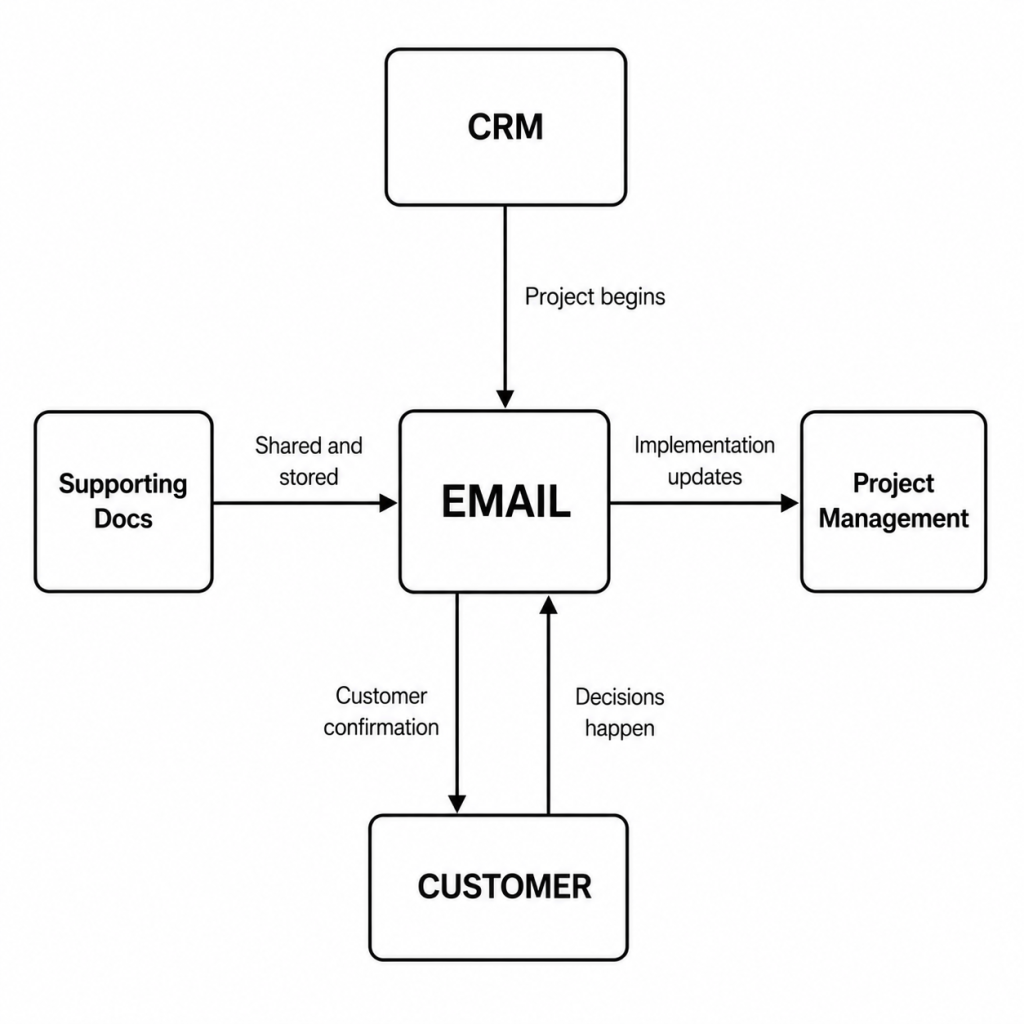
Email Is the Connective Tissue of Modern Work

The typical business has invested heavily in collaboration software, CRMs, ticketing systems, project management platforms, knowledge bases… You name it.

Yet email continues to connect all of them.

Diagram showing email connecting business systems and customer workflows.

Eventually, organizations trying to improve team visibility across tools and departments discover that email provides the missing operational context.

Improving leadership visibility doesn’t mean taking a chainsaw to existing systems. It’s about understanding how the most critical central channel links them all together, and how to keep track of email tasks.

Without that context, leaders see disconnected activities rather than complete workflows (and a pretty complete data trail to go with them).


Alert Fatigue Makes Critical Signals Harder to See

Volume creates another hidden operational cost.

When employees receive well over 100 emails each day, every notification competes for attention. Security alerts, customer escalations, approval requests, project updates, newsletters, and automated system messages all arrive in the same place.

This creates a form of alert fatigue that’s risky beyond just cybersecurity.

Important operational signals become harder to distinguish from routine noise. That matters during customer escalations, compliance investigations, and service incidents, where delayed responses can increase both cost and business risk.

To course-correct, organizations may strive to “improve incident response notifications” (however measurable that is). But if people are already overwhelmed, anything less than an at-source fix will be insufficient.

Microsoft’s guidance instead focuses on reducing low-value alerts and adding enough context that the important ones stand out. The same idea applies to business communication: find and fix the upstream patterns creating the noise, not just the pings about it. 


When Communication Blind Spots Become Business Problems

The average communication breakdown never makes the news, but the ones that do illustrate how seemingly ordinary coordination failures can escalate into costly consequences.

Communication breakdowns snowball into operational failures

Remember Southwest Airlines’ 2022 holiday scheduling meltdown? Nearly 17,000 flights were canceled after severe weather exposed weaknesses in the airline’s crew-scheduling systems and operational coordination. More than two million travelers were affected, customer support channels became overwhelmed, and the airline later reached a $140 million settlement with the Department of Transportation.

The lesson extends well beyond aviation. Operational failures begin with one catastrophic mistake Catastrophic mistakes result from a pile-on of little operational failures. Dozens or hundreds of small communication breakdowns accumulate without anyone seeing the broader pattern. Or maybe they’ll notice it as the Southwest Airlines Pilots Association (SWAPA) did but get ignored by their higher-ups. 

Trusted communication channels can become hidden business risks

In what’s becoming something of a common occurrence, an engineering and manufacturing company sued a law firm and one of its members for “recklessly” transferring $1.1 million to fraudsters. The crafty attackers inserted fake wire instructions into an existing email conversation, exploiting a communication channel the law firm’s employees already trusted.

Email isn’t just where people exchange messages. It’s where authority is delegated, payments are approved, contracts are negotiated, and sensitive information changes hands. Without email intelligence, unusual communication patterns can look completely ordinary until seven figures of damage has already been done.

By and large, your business may never experience a crisis as cataclysmic as these. What might hit closer to home, though, are the dozens of smaller losses that quietly erode productivity and trust. Individually, they appear isolated. But viewed together, they reveal recurring communication trouble areas that deserve attention long before they become a headache.


Turning Email Into Operational Intelligence

Since email was invented as a communication medium, organizations have been treating it like just that… a communication medium and, if authorities require it, something to retain.

Forward-looking businesses, however, are beginning to treat it more like something they can learn from.

An email analytics platform helps bridge that gap by combining secure archiving with operational insight.

Org IQ combines immutable email capture with powerful search, reporting, sentiment analysis, AI-assisted tagging, employee-focused reporting, guest access, and analytics designed to help organizations understand communication patterns rather than simply exchange and preserve messages.

For executives, that translates to stronger communication insights into response-time trends, collaboration patterns, and workflow bottlenecks.

For HR, it means earlier operational visibility into communication changes that may warrant closer attention.

For Legal and Compliance, it means faster retrieval, stronger audit readiness, and less time spent reconstructing historical decisions.

Therein lies the hidden cost of email-driven work: operating without the visibility and intelligence needed to understand how work actually gets done.

Organizations that reduce those blind spots make faster decisions, preserve institutional knowledge, improve cross-functional collaboration, and solve problems while they’re still manageable rather than after they’ve become expensive.


Frequently Asked Questions

What is email-driven work?

Email-driven work refers to business processes that rely heavily on email for approvals, customer communication, coordination, decision-making, and knowledge sharing. For many organizations, email remains the primary record of how work gets done.

Why does workplace communication visibility matter?

Workplace communication visibility helps organizations identify patterns such as stalled approvals, repeated escalations, overloaded teams, and collaboration bottlenecks before they develop into larger operational or compliance issues.

How is email intelligence different from email search?

Email search retrieves known messages. Email intelligence analyzes communication patterns across many messages to surface operational trends, collaboration issues, and emerging risks that individual searches cannot reveal.

What does an email analytics platform do?

An email analytics platform like Org IQ combines searchable archives with reporting and communication analytics to transform everyday communication into actionable operational insight, helping organizations identify trends, reduce risk, and improve decision-making.

How can organizations find information trapped in email?

The first step is treating email like the organizational knowledge it is, not just personal correspondence. Searchable archives, structured tagging, and organizational email analysis make it easier to retrieve historical decisions, customer context, approvals, and other business-critical information without relying on individual memory.

How can businesses improve team visibility across tools?

Most organizations already use multiple systems for projects, documents, customer relationships, and collaboration. Improving visibility means connecting the communication layer between those systems so leaders can understand how work flows across the business rather than viewing each platform in isolation.

How Executives Detect Organizational Risk Before It Becomes a Problem

Organizational risks don’t appear overnight. Employee turnover, customer churn, compliance failures, operational bottlenecks, and fraud events are often preceded by weeks or months of smaller warning signs. The challenge for executives is recognizing those signals before they become formal incidents. 

Some leaders rely on experience and instinct. Others use reporting, workforce analytics, customer feedback, or communication data to spot emerging issues. Many organizations combine all of the above, using AI and organizational intelligence tools to surface patterns that would otherwise remain hidden. 

This blog post explores how executives detect organizational risk early, the communication signals that often appear first, and how leadership teams can combine judgment, data, and AI insight to make better decisions before problems escalate.

The communication patterns that matter first

The earliest operational risk signals show up in ordinary communication, long before they appear in a board pack or formal escalation.

  • Response-time drift. Few organizational health metrics are as easy to dismiss as a slower reply, yet responsiveness is closely tied to how work gets done. Studies of workplace email behavior have found that high performers tend to respond more consistently, while changes in communication patterns are associated with burnout and disengagement. When previously reliable contributors begin replying later or stop taking clear ownership, something upstream might be starting to break.
  • Stalled threads. Work moves at the speed of decisions. When email conversations stretch across repeated follow-ups, looping questions, and unresolved requests, they usually reveal a breakdown in ownership, authority, or process. Here, the thread content itself isn’t risky. The organizational friction keeping it at a snail’s pace is.
  • Attrition clues. Employees rarely wake up one morning and decide to hand in their badge. Long before a resignation hits HR’s desk, engagement starts to fade in everyday exchanges. A study published in Computers in Human Behavior found that managers who later left their organizations exhibited measurable communication changes months beforehand, including weaker engagement and shifts in their position within workplace networks.
  • After-hours overload. The average worker receives 117 emails per day, is interrupted every two minutes during core hours, and sends or receives more than 50 messages outside standard business hours. If extraordinary effort becomes ordinary, leaders might want to consider whether workload, staffing, or process design is being operated sustainably.
  • Fraud and mishandling. The FBI’s 2024 IC3 report logged 21,442 business email compromise complaints and about $2.77 billion in losses. While these losses grab the headlines, the underlying lesson is more important: Email isn’t just where work gets done. It’s where approvals are granted, payments are authorized, and sensitive information changes hands, making it one of the clearest windows into operational risk.

Why instinct demands evidence

Instinct is often a leader’s first risk detection system. The question isn’t whether leaders should trust their gut. It’s how they should validate it. 

As organizations grow, separating genuine risk from false alarms becomes trickier. What once felt obvious now requires a paper trail, context, and a way to determine whether a pattern is isolated or systemic.

Instinct is usually right about where to look

Gary Klein’s Recognition-Primed Decision (RPD) model suggests that experts often make decisions by recognizing patterns from prior experience rather than evaluating every possible option. 

That helps explain why experienced leaders can sense organizational risk before it appears in a report. Years of exposure to customer issues, turnover, and operational failures make certain warning signs difficult to miss.

The problem is scale

As organizations grow, leaders lose direct access to many of the conversations that generate risk signals. Still, delayed responses, communication bottlenecks, disengagement, and customer friction remain visible in everyday interactions, so spotting them requires systems rather than observation alone.

So what’s a manager to do?

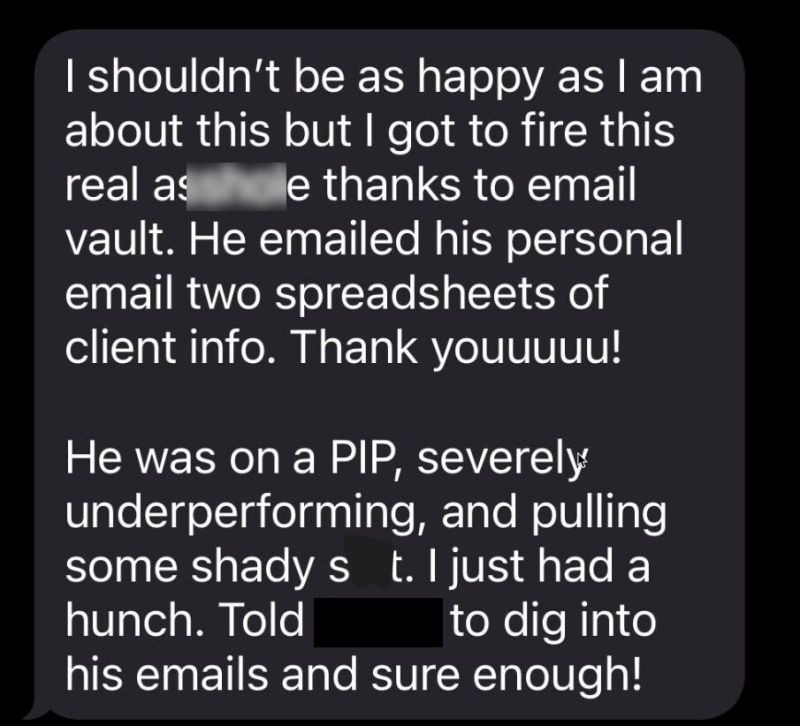
A hunch can start an investigation. It can’t justify a decision. 

Whether the issue involves staffing, compliance, customer experience, or performance, evidence is key leadership decision support, determining whether that was an isolated incident or a broader trend. Evidence turns intuition from a feeling into something an organization can act on.

Text message describing misconduct found through email records.

What executive visibility looks like in practice

Strong executive visibility ≠ reading everyone’s inbox. In an increasingly tech-enabled workplace, it often looks like summarizing weak signals into a small set of usable views that leaders can revisit, question, and act on.

  1. Track patterns, not incidents: Individual emails don’t tell leaders much. Risk becomes visible when the same signal appears repeatedly across teams, customers, or workflows. The goal is to identify trends upstream, before they become operational, cultural, or compliance problems.
  1. Measure work as it actually happens: Response delays, stalled decisions, repeated escalations, after-hours activity, and customer friction reveal how work moves through an organization. These workforce risk analytics provide a fuller, more unbiased picture than self-reported updates or periodic reviews.
  1. Prioritize leading indicators: Most executive reporting focuses on outcomes that happened ages ago. Effective early risk detection focuses on the behaviors and communication patterns that precede turnover, burnout, customer dissatisfaction, process failures, and other business risks.
  1. Look for signal clusters: A delayed response means little on its own. Combined with after-hours overload, stalled threads, and declining engagement, it starts to form a concerning pattern. Organizational risk is easier to isolate when multiple business risk indicators point in the same direction.
  1. Make evidence easy to validate: Leadership intuition is strongest when it can be tested against real data. Searchable records, trend analysis, and simple executive dashboards help leaders determine whether a concern is isolated, systemic, improving, or getting worse over time.

Where AI fits into early risk detection and leadership intelligence

AI is useful here for one simple reason: it can absorb far more information than you or I ever could. 

Research across risk management, fraud detection, and cybersecurity consistently finds that AI performs best when identifying patterns, anomalies, and relationships across large volumes of data. It can surface connections that would be difficult, if not impossible, for a human to spot manually. 

That strength is also its limitation. AI can tell you that something is unusual. It can’t reliably tell you why (or if) it matters. 

A model might identify a cluster of behaviors that differ from the norm, but it lacks the organizational context needed to determine whether those changes reflect risk, growth, restructuring, seasonality, or something else entirely. 

That’s why NIST’s AI Risk Management Framework emphasizes human oversight, explainability, and governance rather than fully automated decision-making. 

As with most things tech, the most effective approach combines both data and human experience. AI expands the field of view and shortens the distance between suspicion and evidence. Leaders contribute judgment, context, and accountability.

A practical checklist for prompt risk detection

If you want earlier signal spotting without adding more meeting debt, keep the system simple.

Many destructive organizational fires begin as sparks that seemed too small to pay mind to. Yet the warning signs were scattered across everyday work, waiting for someone (and their savvy system) to connect the dots.


Where to go from here

If your organization has ever experienced:

  • a resignation that came out of the blue,
  • a customer issue that escalated further than it should have,
  • a compliance concern discovered months after the damning audit,
  • a team struggling with burnout despite no textbook warning signs, or
  • leadership always asking, “How did we miss that?”

then you’ve already felt the pinch of limited visibility into the signals that precede organizational risk.

Org IQ helps leaders turn everyday communication data into actionable intelligence, making it easier to spot emerging risks, validate concerns, and understand how issues are evolving before they become costly headaches.

If you’d like to see it in practice, walk through our personalized use cases, review the platform’s capabilities, or start a free trial to experience them yourself.


Frequently Asked Questions

What are the earliest signs of organizational risk?

Organizational risk emerges gradually through subtle shifts in communication, decision-making, accountability, employee engagement, customer sentiment, or operational consistency. The earlier leaders identify those patterns, the more options they have to address them.

Can communication patterns predict business problems?

While no single email or Slack message can claim clairvoyance, communication patterns do reveal emerging issues before they become visible elsewhere. Changes in responsiveness, collaboration, escalation frequency, and engagement often provide an early indication that a team, process, or customer relationship requires attention.

How do you build an organizational early warning system?

Experienced leaders combine instinct with evidence. They look for recurring patterns rather than isolated incidents, validate concerns against organizational data, and focus on signals that appear before formal escalations, performance issues, customer churn, or employee turnover.

What role does AI play in early risk detection?

AI helps organizations analyze communication patterns, relationships, and behavioral trends at a scale humans can’t match. Platforms that apply AI to searchable workplace data can help leaders move from suspicion to evidence faster, making earlier intervention a reality.

What is executive visibility, and why does it matter?

Executive visibility is the ability to understand how work is actually happening across an organization. Tools like Org IQ help leaders surface communication patterns, operational blind spots, and emerging risks that might otherwise remain hidden until they become expensive problems.

12 Questions to Ask Before Choosing an Email Archiving Platform

CliffsNotes

Questions like “How to choose email archiving software” rarely feel urgent, until they suddenly are. 

A regulator asks for records. Legal needs to reconstruct a decision. Leadership wants answers fast, with full context. Then the gaps rear their ugly heads.

What looked like a straightforward storage decision turns into something else entirely. Questions about whether emails were fully captured, whether searches can be trusted, and whether results can be defended under scrutiny…

This guide walks through the questions that surface those gaps early, before you’re forced to rely on the system under pressure. That’s ultimately what separates the best email archiving platforms for business from the rest.

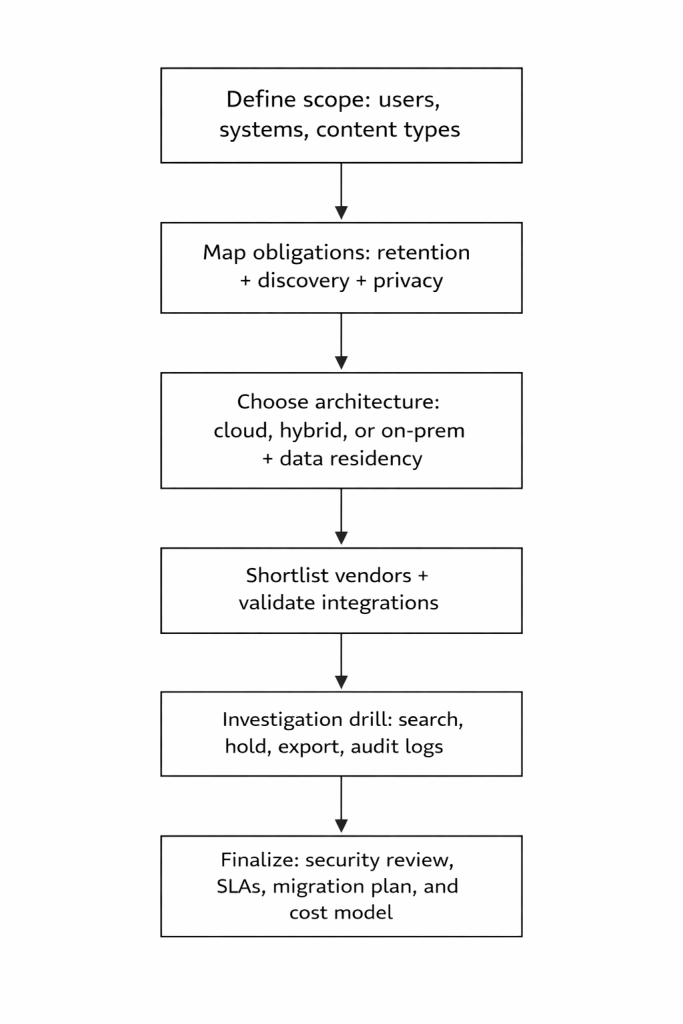
Decision process map

Below is a practical flow for choosing email archiving software.

Compliance planning flowchart with defined evaluation steps

The questions that matter when your data’s on the line

Start here to see where platforms actually hold up, or don’t.

1. What email archiving compliance requirements apply to us, and what proof do they expect?

Requirements may include preserving certain records in a non-rewriteable/non-erasable format under U.S. Securities and Exchange Commission (SEC) Rule 17a-4, documenting and retaining required Health Insurance Portability and Accountability Act (HIPAA) policies for set periods, and applying privacy storage limitations under General Data Protection Regulation (GDPR).

What to look for

A written retention schedule and a mapped list of required controls (immutability, indexing, audit logs, exports).

2. How does the platform capture email, and can we test capture completeness?

Capture method isn’t just a technical detail. It directly affects what ends up in your archive, and what doesn’t.

This becomes especially relevant when evaluating email archiving for Microsoft 365 or email archiving for Google Workspace, where capture methods differ based on how each platform exposes data and handles routing.

Some approaches capture messages as they pass through the mail system, which tends to preserve a complete, tamper-resistant record. Others rely on APIs or mailbox access, which can add context and flexibility but may depend on platform limits, timing, or permissions.

Those differences shape what you can retrieve later, how defensible your records are, and whether gaps only show up during an investigation.

What to look for

Capture method (journaling, API, gateway) plus reconciliation reporting that flags gaps.

3. How does email archive search and eDiscovery work, and can we reproduce results on a time crunch?

When answers are needed STAT, search has to be consistent, explainable, and complete. Your team should be able to run the same query twice and arrive at the same result, with a clear record of how that result was produced.

Differences in how platforms index content and metadata affect what gets returned, how complete those results are, and whether conversations can be reconstructed reliably.

What to look for 

Search operators and filters, conversation reconstruction, and clarity on what metadata is indexed and preserved.

4. Can we manage retention policies and legal holds together without conflicts?

Retention and legal hold operate on different timelines, and how a platform handles that overlap determines whether data is preserved or deleted at exactly the wrong moment.

Legal hold email archiving tools tend to split into distinct branches at this point, since the interaction between retention and hold is where conflicts surface first.

Retention rules define how long data is kept. Legal holds step in when something needs to be preserved beyond those timelines, often indefinitely. In many systems, holds take precedence and prevent deletion until they are explicitly removed.

If that interaction isn’t clear or predictable, teams can end up with unexpected data loss or over-retention that creates risk elsewhere.

What to look for 

Scoped holds (custodian, date range, query), hold audit trails, and documented “hold vs retention” behavior.

5. What is the storage and cost model, including investigation costs?

Pricing shapes how the platform behaves over time, not just what you pay upfront.

Vendors typically price around users or storage, but variations exist: 

  • Storage-based tiers
  • Subscription vs one-time licensing
  • Hybrid models that combine infrastructure and cloud fees

On top of that, some platforms layer in add-ons. Advanced search, analytics, integrations, or even additional security features may sit behind higher tiers or bundled packages that can’t be separated. That can push teams into paying for capabilities they don’t need, or delay access to ones they do.

Those choices affect long-term cost, especially when investigations require exporting data, scaling storage, or unlocking features midstream.

What to look for

Per-user vs storage pricing, bundled vs modular features, investigation-related costs (search, export, eDiscovery), and clarity on how pricing scales.

6. What immutability and audit-trail controls exist for tamper resistance?

Immutability and audit trails determine whether regulators can trust your records under scrutiny.

Regulators don’t just expect records to exist. They expect proof that those records haven’t been altered, deleted, or selectively edited after the fact. That’s why standards like SEC Rule 17a-4 require either non-rewriteable, non-erasable storage or a complete audit trail that captures every change and allows for reconstruction of the original record.

This posture makes for classic defensibility. Without it, you can retrieve an email, but you can’t prove it’s the same email that existed at the time of its creation.

What to look for

Immutable storage (Write Once, Read Many [WORM] or equivalent), preservation locks, full audit trails of all actions, and the ability to verify record integrity over time.

7. Where will archived data live, and what does that mean for data sovereignty?

Where your data lives determines which laws apply to it, and who can legally access it.

Data residency affects not just storage, but also processing, backups, and support access. U.S. organizations often need to account for frameworks like HIPAA, FedRAMP, or ITAR, alongside federal laws like the CLOUD Act, which can grant U.S. authorities access to data held by U.S.-based providers regardless of location.

International obligations such as GDPR also introduce restrictions on cross-border transfers, with mechanisms like Standard Contractual Clauses used to legitimize those flows.

These overlapping rules shape architecture decisions, vendor selection, and even where investigations can be performed.

What to look for 

Data residency options by region, subprocessor transparency, clarity on cross-border transfers, and how the provider handles sovereignty conflicts across jurisdictions.

8. How will the platform perform as email volume and custodians grow?

Archiving is a growth problem. Cloud computing is defined around rapid elasticity, but archives still have real limits around indexing, concurrent searches, and export throughput.

As volume increases, indexing constraints can lead to partially searchable data, while large, multi-custodian searches take longer and compete for shared system resources. Export limits and throughput caps can slow investigations, especially when datasets are large or queries need refinement under time pressure.

What to look for

Published availability/search service level agreements (SLAs), if offered, and performance testing in proof.

9. How is archived data protected end-to-end?

Baselines include encryption at rest and in transit, access control, and audit logging.

Beyond that, platforms diverge in how encryption is implemented and controlled. Some rely on provider-managed keys for simplicity and low overhead, while others support customer-managed keys, giving organizations control over key access, rotation, and revocation.

That choice affects who ultimately controls access to the data, how quickly access can be restricted in an incident, and how well the system aligns with stricter compliance or internal security requirements.

What to look for

Encryption and key management details, SSO/MFA support, and security logs usable by your Security Operations Center (SOC).

10. Who can access, restore, and export data, and can we prove chain of custody?

Access should support Legal and HR workflows without turning IT into a bottleneck, while maintaining auditability. 

Clear role-based permissions determine who can view, place holds, restore, or export data, and every action should be logged with time, user, and scope. That record is what establishes chain of custody, allowing teams to show who accessed what, when, and how data moved from archive to production. 

In regulated contexts, the ability to reconstruct that sequence is directly tied to whether evidence is considered reliable.

What to look for 

Role-based access, delegation, read-only reviewer roles, controlled restores, and export audit trails.

11. What SLAs, support, and migration services are included in writing?

NIST cloud guidance highlights the need to review SLAs and service terms before adopting a platform. Vendors also publish migration prerequisites and tooling for legacy archives.

In practice, SLAs define response times, uptime expectations, and escalation paths when something breaks. Support scope varies widely, from basic ticketing to hands-on onboarding and troubleshooting

Migration services matter just as much, since incomplete or poorly mapped imports can create gaps that only surface later during audits or investigations.

What to look for 

Written SLAs, escalation timelines, migration runbooks, and tested export and exit terms.

12. What visibility do we have into archive health and policy coverage over time?

You need clear, ongoing clarity into how the archive is behaving over time. That includes whether retention policies are applied as expected, whether data is being captured without gaps, and whether system activity aligns with internal controls.

Strong reporting surfaces patterns, not just events. It helps teams spot policy coverage drift, identify inconsistencies across custodians or data sources, and confirm that the archive remains complete, current, and aligned with requirements as the organization changes.

What to look for 

Audit reports for searches, views, exports, and admin actions; plus retention and hold dashboards.

Put these questions into practice

Reading a blog post is one thing. Pressure-testing vendors is where the real work begins. Here’s a solid place to start.

1. Compare Org IQ against the legacy players

If you’re cross-shopping Org IQ (hi, that’s us) with any of the most popular legacy players in the market, there’s a good chance we’ve already done the heavy lifting for you in a dedicated compare article.

The throughline across most of those? Org IQ goes beyond basic journaling and passive storage to actively surface actionable insights from email. And yes, exporting your data doesn’t require signing your soul away.

For a more detailed breakdown, including how each platform stacks up against the 12 questions above, you can explore the full compare library.

2. Use this email archiving vendor evaluation template

We’ve also put together a practical evaluation template to help teams run structured comparisons without losing track of what matters.

Use it to:

  1. Score vendors consistently across the same criteria
  2. Track capture, search, and retention behavior side by side
  3. Document gaps, risks, and follow-up questions as they surface
  4. Align IT, Legal, and leadership on a shared evaluation framework
  5. Create a defensible record of how the final decision was made

It’s simple, structured, and built to keep evaluations grounded in real-world performance.


A tl;dr vendor-selection framework

Use the same investigation drill and success criteria for every vendor, and don’t negotiate final pricing until the vendor has passed the drill and your legal and security teams have approved the written SLA and exit terms.


Frequently Asked Questions

1. How do I choose the right email archiver for my business?

Focus on capture completeness, search reliability, compliance support, and cost structure. The right platform consistently captures all email data, enables fast, defensible retrieval, and scales without introducing gaps or operational bottlenecks.

2. What should I look for in an email archiving platform comparison?

Compare how vendors handle capture, search, legal hold, and exports under real conditions. Platforms like Org IQ go further by layering analytics on top of archived data, helping teams surface patterns and risks, not just store emails.

3. Which email archiving solutions support legal hold and eDiscovery workflows?

Effective email retention and archiving solutions preserve emails in immutable storage, allow targeted legal holds, and enable fast search and export. Legal hold ensures relevant data is retained without alteration during investigations or litigation.

4. What are the differences between journaling, API, and gateway-based email archiving?

Journaling captures emails in transit for completeness, APIs provide flexible access to mailbox data, and gateways filter traffic before delivery. These differences impact data integrity, metadata capture, and how reliable the archive is during investigations.]

5. What’s the difference between email backup and email archiving?

Backup supports recovery after data loss, while archiving preserves emails long-term in searchable, immutable storage for compliance, audits, and investigations. Archiving is designed for governance, not just restoration.


SOC 2 Explained: Why It’s Critical for Platforms That Handle Sensitive Data

If you’ve ever been mid-sales cycle, mid-procurement, or mid-security review and somebody drops “Can you share your SOC 2?” into the thread, the subtext is clear: 

Can we trust you with data we can’t afford to lose, leak, or mishandle?

What triggers the SOC 2 request in the first place

SOC 2 doesn’t come up in vendor reviews because someone woke up suddenly craving PDFs. Searches around “soc 2 audit meaning” or “SaaS security compliance” usually start in one or all of those moments:

  1. A security questionnaire is turning into a novel. Instead of answering 200 questions about information security controls, the buyer wants an independent report that covers the basics in one package. SOC reports exist to provide assurance information that helps users assess and address risks tied to outsourcing services.
  1. A vendor risk assessment hit the sensitive data threshold. If a platform is expected to process or store sensitive communications, personal info, confidential business data, or all three, the buyer starts looking for recognizable data security standards that translate across industries. The American Institute of CPAs (AICPA) positions SOC 2 as a report that provides this exact assurance.
  1. The buyer needs a solution that’s fluent in third-party risk management. Third-party risk is insidious in the indirect exposure it subjects businesses to. You rely on vendors, and they rely on other providers, which expands your risk beyond systems you directly control. The National Institute of Standards and Technology (NIST) highlights this gap and outlines practices to identify, assess, and mitigate risks across vendor dependencies and underlying systems.
  1. Someone with signing authority wants proof that controls run daily, not only during demos. This distinction is the real separation point between a good security story and a SOC 2 Type II report (more on that below).

SOC 2 audit, explained like you’re five

The AICPA describes a SOC 2 examination as a report on controls at a service organization that are relevant to security, availability, processing integrity, confidentiality, or privacy. That wording matters: it’s about controls, scoped systems, and what an independent service auditor can reasonably conclude based on evidence.

If you’ve heard people casually say “SOC 2 certified,” you can usually translate it to: “We have a SOC 2 report.” The more accurate language is simply that it’s an examination and report.

SOC 2 is built for readers doing due diligence

A SOC 2 report is intended for users who need detailed information and assurance about the service organization’s controls over the systems used to process user data and protect confidentiality and privacy.

And the AICPA’s description criteria further clarify the “who is this for?” question: 

SOC 2 reports are intended for people who already have sufficient knowledge and understanding of the service organization, the services provided, and the system in scope. That’s one of the reasons the report is meant only for the eyes of specified parties (not the general public).

SOC 2 revolves around service commitments and system requirements

The AICPA’s description criteria, DC 200, explains that the system description in a SOC 2 report is designed so report users can understand the system, including the processing and flow of data through and from the system, and the controls used to manage risks that threaten meeting service commitments and system requirements.

That’s at the heart of why SOC 2 compliance matters. It’s a structured way to talk about how a platform actually handles sensitive data in the real world.

Trust Services Criteria: the five buckets SOC 2 can cover

SOC 2 is anchored in the Trust Services Criteria, and those categories aren’t abstract. They map directly to what buyers worry about when a platform touches highly sensitive data.

Security
Information and systems are protected against unauthorized access, unauthorized disclosure, and damage that could compromise availability, integrity, confidentiality, and privacy.
Availability
Information and systems are kept operational and accessible through controls that support availability, monitoring, and maintenance, aligned with business objectives.
Processing Integrity
System processing is complete, valid, accurate, timely, and authorized to meet the entity’s objectives.
Confidentiality 
Information is protected to meet objectives, covering confidential data like personal information, trade secrets, and intellectual property.
Privacy 
Personal information is collected, used, retained, disclosed, and disposed of to meet the entity’s objectives; criteria include areas like notice, choice/consent, use/retention/disposal, access, and disclosure/notification.

One more detail that helps when you’re trying to read SOC 2 without giving yourself a headache:

  • The Trust Services Criteria are organized into common criteria (CC-series) plus category-specific criteria. 
  • Focus on the CC-series, which organizes core controls like access, monitoring, change, and risk into something you can actually evaluate.

SOC 2 Type I vs Type II

Why does the distinction matter? And why are procurement teams on the lookout for it during security and risk reviews?

Type I covers single points in time

SOC 2 Type I addresses the same general subject matter as Type II, but it does not include:

  • an opinion on operating effectiveness, 
  • the detailed tests of controls and results. 

Think of it as “this is how the control design looked on the date being reported.”

If a vendor hands you Type I during a vendor risk assessment, it can still be useful. It confirms the existence and design of their security claims. It just won’t clue you in on how consistently those controls operated over a period.

Type II is the more reliable version in the long term

Type II includes:

  1. an opinion on the operating effectiveness of controls over a specified period, and 
  2. a detailed description of tests of controls performed and the results of those tests…

…which explains why Type II tends to matter more to buyers. 

When you’re handing over sensitive customer data, the question is never “could this work on some random Tuesday?” It’s “did these controls actually run day after day, and can we count on them to keep doing so?”

The reasonable assurance reality check

Even Type II isn’t a promise of perfection. The AICPA defines reasonable assurance as high, but not absolute, and notes attestation risk can’t be reduced to zero due to testing limits and inherent constraints.

That’s not a knock on SOC 2. It’s the whole point of how assurance works. Evidence-based confidence ≠ a guarantee that nothing can ever go wrong.

Why SOC 2 matters more for platforms that ingest sensitive communications

When a platform handles sensitive communications, SOC 2 quickly shifts from a box-checking exercise to something that feels much closer to home. These systems aren’t just dealing with generic data. They’re handling conversations that carry context, intent, and sometimes real consequences.

1. Confidentiality and privacy show up in the data itself 

The Trust Services Criteria define confidentiality as the protection of sensitive information, including personal data, trade secrets, and intellectual property. Privacy focuses on how personal information is collected, used, stored, and shared. 

That maps directly to communication systems. This is where real business context lives: negotiations, employee concerns, customer escalations, and internal strategy. It’s not just data, it’s the story behind decisions.

2. Access control gets harder as more teams need visibility 

Communication platforms tend to attract a wider group of stakeholders. Legal, HR, leadership, and auditors may all need access, but not to the same level of detail. This is where least-privilege access becomes critical. People should only see what they need to do their job. 

SOC 2 helps you evaluate whether that principle is actually enforced over time, with proper roles, logging, approvals, and restrictions, not just documented in theory.

3. Communication intelligence introduces a second layer of risk 

Platforms that analyze communications go beyond storage. They surface patterns, relationships, and signals. That means you’re protecting more than message content. You’re also protecting what can be inferred from it. 

SOC 2 won’t answer every product-specific question about analytics behavior, but it does give you a structured view of how the system is operated and controlled behind the scenes.

4. Retention and deletion become real risk controls, not just settings

Communication data sticks around longer by design. That raises the stakes on retention policies, legal holds, and defensible deletion. SOC 2 helps you verify that retention rules are consistently enforced, not left to manual cleanup or ad hoc decisions.

5. Monitoring and audit trails carry more weight

With sensitive conversations, it’s not enough to restrict access. You also need a clear record of who accessed what, when, and why. SOC 2 emphasizes logging, monitoring, and review processes so access isn’t just controlled, but traceable.

6. Incident response has a higher business impact

If something goes wrong, the fallout isn’t limited to exposed files. It can include leaked conversations, reputational damage, or legal exposure. SOC 2 looks at whether there are defined processes to detect, respond to, and recover from incidents involving sensitive data.

7. Third-party dependencies expand the risk surface

These platforms often rely on infrastructure providers, integrations, or subprocessors. SOC 2 includes controls around vendor management, which helps you assess whether those dependencies are vetted and monitored over time.

8. Change management matters more than it seems

Small changes in how data is processed, analyzed, or accessed can have outsized consequences. SOC 2 evaluates whether updates to systems and controls are tested, approved, and tracked before going live.

How to use a SOC 2 report in a vendor risk assessment

If you want to get real value out of SOC 2 compliance during a vendor risk assessment, here’s a clean checklist that maps to what the standards say the report is trying to accomplish.

Quick SOC 2 FAQ for buyers

Can a vendor share their SOC 2 publicly?

SOC 2 reports are generally treated as restricted-use reports shared with customers, regulators, and business partners who need assurance, often under an NDA or via a secure data room. If a vendor wants something publicly shareable, SOC 3 is a more general-use report that can be freely distributed.

What’s the practical difference between SOC 2 and SOC 3?

SOC 3 covers similar trust services categories but provides less detail and is meant for general distribution. SOC 2 is the detailed report used in due diligence.

What should a SOC 2 Type II report contain?

The AICPA’s illustrative SOC 2 Type II example includes management’s assertion, the system description, the service auditor’s report, and tests of controls with results.

If a vendor only has Type I, is that useless?

It’s still informative on design, but Type I doesn’t include operating effectiveness or detailed test results. Whether it’s “enough” depends on how much risk you’re taking on and how mature your vendor risk assessment program is. More likely than not, the vendor will also be pursuing a longer-term Type II report, so you can ask them for updates on that, if applicable.

Conclusion + Platform review next steps 

SOC 2 is the baseline, not the full picture. It shows how controls are designed around access, monitoring, and data handling. For platforms working with communications, you still want to layer in product-specific questions around retention, permissions, guest access, and how insights are shared. 

As an example, Org IQ has completed its SOC 2 Type I audit (with a Type II review in the works, as of this publication). This means an independent auditor has reviewed how we’ve structured our system to protect sensitive data against the AICPA Trust Services Criteria. 

That gives you a starting point, a neutral opinion on how controls are designed. From there, use the vendor’s public security page as your map. It should outline how data is stored, accessed, and protected, so you know what to look for when reviewing the report itself. 

One clean heuristic? Product pages tell you what the platform does with your data. SOC 2 helps you verify how those controls are set up in practice.

What Organizations Lose When Employees Leave (And How to Protect Institutional Knowledge)

Employee turnover is often treated like a hiring problem. But the real damage rarely comes from the drop in headcount. It comes from what quietly disappears with the person: 

The full picture behind decisions, the history of customer relationships, the unwritten rules of how work actually gets done, and the “tribal knowledge” that never made it into an offboarding doc.

That’s the definition of institutional knowledge loss. And it’s one of the most underestimated forms of operational exposure in growing organizations.

This breakdown explains what organizations lose when employees leave, why those losses are so hard to recover, and what a real knowledge retention strategy looks like in practice, especially when so much organizational memory lives in email.


Employee Turnover Empties More Than Their Desks

Most leaders understand that losing talent is disruptive. Fewer leaders understand how specific the losses are, and how quickly they compound. 

Here is what typically disappears during employee exits:

1. Decision history

Why was a certain vendor chosen? Why did Customer X get special pricing? Why was that atypical policy exception made? Why was the project pivoted halfway through?

2. Customer and partner relationships

The trust built over years. The informal “rules” governing interactions. The story behind past conflicts or near-churn moments. The personal preferences that keep accounts stable.

3. Operational shortcuts and internal workflows

The actual process, not the one in the handbook. Who really signs off on things. Which steps can be skipped safely. Which steps cannot.

4. Institutional memory of risk

Past issues that were resolved quietly. Near misses that never became official incidents. Vendor problems that were patched over. Internal conflicts that never escalated, but shaped team behavior.

5. Cross-functional context

The hidden dependencies between teams. The “we tried this already” history. The reasons certain stakeholders must be looped in early.

6. The invisible work

The handoffs. The reminders. The follow-ups. The coordination glue that rarely shows up in performance reviews.

All of which can contribute to crippling losses in momentum. 

A Panopto workplace study found that employees waste more than five hours per week searching for or recreating information that should already exist, largely due to poor knowledge sharing. Based on that, firms with ~1,000 employees might lose roughly $2.4 million annually in productivity solely due to day-to-day inefficiencies stemming from poor knowledge sharing.

These findings explain why employee exit impact can feel disproportionate to a simple change in the roster. You’re not just replacing a person. You’re rebuilding the web of context that had them at the center, which makes recruiting look easy.

Why institutional knowledge loss happens even in “well-documented” organizations

Many companies hear “knowledge retention strategy” and think documentation. Documentation helps, but it’s rarely the whole story, because institutional knowledge tends to live in motion, not in static files.

Comms (not systems) hold the bulk of institutional knowledge

Even the most by-the-book teams make real-time decisions via routine exchanges.

  • “Can we extend the close date?”
  • “Please confirm: are we liable here?”
  • “Approved – make the exception this time.”
  • “New priority: pause everything for Friday.”
  • “Escalating this: client’s threatening to churn.”
  • “Let’s align expectations before this moves any farther.”

All these are quick emails you’ve probably sent or received that spurred larger conversations, because email is ground zero for external relationships, approvals, and work handoffs.

Therefore, comprehensive process docs will still fall short in preserving institutional memory. The best they can do is spell out outcomes, while most of the decision-making timeline lives in threads.

Offboarding processes are a useful, but incomplete, HR checklist

Most offboarding focuses on minutiae like device return, access removal, payroll and benefits, and compliance paperwork

All important, but none of it captures the real continuity problem.

So offboarding ends where the checklist does. HR can do everything “right,” but the unexamined email record becomes the crack that turns into a future operational failure.

Many organizations have lived this story: a senior contributor leaves, and exit interviews and handover documents are completed satisfactorily. The administrative parts are done and dusted, but the background for how decisions were made, how edge-case exceptions were handled, and how relationships were managed stays solely in the former employee’s head — simply walking out the door with them.

People don’t know what they know… until it’s missing

One of the most frustrating parts of losing institutional memory is that it’s not always obvious what was valuable.

Nobody labels an email thread as:

“This is a critical bit of info that’ll help you in 18 months.”

But when a customer case escalates, a regulator asks a trick question, or a new team member needs clarity on the decision trail, suddenly the missing rationale matters more than the project plan ever did.

The hidden cost of employee turnover: continuity failure

Turnover is expensive in obvious ways: recruiting, onboarding, lost productivity…

But the bigger risk is continuity failure, when the organization can no longer operate smoothly because it can’t access its own history.

These are the six most common continuity breakdowns caused by losing institutional knowledge, according to HRMorning:

  1. Customers feel like they’re starting over
    • The new rep asks questions the customer already answered.
    • Past issues are re-litigated.
    • Trust drops.
  2. Projects stall because nobody knows “why”
    • Teams inherit tasks without the full background.
    • Prior decisions get reversed accidentally.
    • Complete work gets repeated.
  3. Vendor relationships degrade
    • Escalations and promise delivery lose momentum.
    • Nobody knows who owns the account.
    • Contract obligations are unclear.
  4. Internal decisions become harder to defend
    • Leadership has to rely on memory, not evidence.
    • There’s no clear record of approvals.
    • Exceptions can’t be explained.
  5. Risk and compliance exposure increase
    • Investigations take longer and involve more people.
    • There’s no clear record of approvals.
    • Exceptions can’t be explained.
  6. New hires ramp slower than they should
    • They rely on secondhand explanations.
    • They have to reconstruct history.
    • They make avoidable mistakes.

This is why workforce continuity isn’t just an HR metric. It’s a business momentum concern.

Offboarding dangers that email retention can immediately reduce

You don’t need a massive transformation to mitigate employee offboarding risks. Often, it just comes down to recognizing the scattered threads from and within your organization as the gold they are.

Here are some practical steps most organizations can take to do so quickly:

1. Treat email as an organizational asset

Emails often contain decisions, customer history, and workflow details that never make it into documentation. Treating them as business records — not inconsequential chatter — lets organizations preserve operational memory rather than letting it walk out the door with a departing employee. 

This aligns with records retention best practices that emphasize classifying and capturing high-value content rather than relying on informal storage.

2. Capture communication automatically

Manual exports and remembering to CC others are not reliable continuity mechanisms. 

Experts recommend building structured handovers into offboarding and using tools or processes that automatically capture critical communication so knowledge doesn’t slip through the cracks when someone leaves.

3. Preserve full context, not snippets

Whole conversations, attachments, timestamps, and participants matter because they show how decisions unfolded over time. Fragmented snippets can lead to misinterpretation or incomplete understanding. 

Best practices in people knowledge management call for capturing context-rich information so successors can reconstruct what actually happened.

4. Make historical email searchable for the right people

Legacy context matters most during transitions. Role-based access for successors, HR, legal, and leadership helps organizations keep work moving smoothly without forcing new hires to reinvent history. Balanced access controls also ensure security and compliance.

5. Build operational stability into offboarding

Offboarding isn’t just about closing accounts or revoking access. It’s a chance to transfer relationship history, key decisions, and project-specific know-how. 

HR best-practice guides encourage exit interviews and standardized handover documentation precisely to preserve institutional knowledge that would otherwise be lost.

6. Reduce “single-point-of-context” roles

When only one person knows how a process really works, the organization becomes dependent on that individual. 

Research on knowledge retention and transfer highlights that organizational risk rises when expertise is siloed; creating redundancy and shared understanding reduces that risk.

7. Use structured tagging and reporting

Categorizing communication by topics like customer complaints, high-risk interactions, or key accounts makes institutional knowledge easier to retrieve and analyze. Organized information supports faster decisions and helps avoid repeating past mistakes. 

Knowledge management best practices stress structured metadata for precisely this reason.

8. Test continuity like you test disaster recovery

A smooth handoff isn’t proven until someone new can find critical context quickly. In the same way organizations test disaster recovery plans, testing knowledge for momentum disruptors — e.g., locating six months of key decision history in under 10 minutes — validates that your knowledge retention strategy actually works.

It’s certainly not glamorous. But it is sound operational hygiene that’ll save your business sanity and a pretty penny in the long run.

How Org IQ helps protect institutional knowledge without turning the company into a surveillance state

Most leaders want smoother handoffs, but they hesitate for a valid reason:

They don’t want to create a culture of monitoring.

The good news? Knowledge retention doesn’t require micromanagement. It only requires visibility into what the business already owns.

Preserving continuity when employees leave

Org IQ is designed to preserve business communication so organizations can maintain forward progress during transitions, including workforce changes.

Instead of solely relying on a departing employee to export threads, remember details, or hand over folders, a centralized archive preserves the full record of communication.

That means successors can pick up:

  • customer history
  • vendor escalations
  • project decision trails
  • approvals and exceptions

without starting from scratch.

Surfacing hidden danger and dependency patterns

One of the biggest operational stability risks is overreliance on a single person as the “context hub.”

Org IQ’s analytics-forward framing is built around surfacing patterns that are easy to miss when information is distributed across inboxes.

That includes:

  • communication breakdowns
  • recurring unresolved issues
  • dependency bottlenecks
  • stalled escalations

This helps leadership intervene earlier, while the organization still has time to transfer knowledge and reduce vulnerability.

Making organizational memory usable, not just… there

A “backup” is not organizational memory. Organizational memory is:

  • searchable
  • intact and defensible
  • structured enough to retrieve quickly
  • accessible to the right stakeholders as soon as they need it

Org IQ emphasizes that an archive only becomes useful when teams can find what matters without digging through inboxes one thread at a time.

Final takeaways: protecting organizational memory is a leadership responsibility

Employee turnover is inevitable. Institutional knowledge loss is not.

Organizations that treat offboarding as a checklist will keep losing context, relationships, and decision history, then pay for it again in churn, delays, and repeated mistakes.

Organizations that treat business memory as an asset build workforce continuity, even during change.

Next steps

If your organization has ever experienced:

  • leadership struggling to defend past decisions,
  • a customer relationship reset after a departure,
  • a project stalling because “nobody knows why we did this,” or
  • a vendor escalation losing momentum because the main contact left,

then you’ve already felt the cost of underleveraging institutional knowledge.

Org IQ helps teams preserve email-based institutional knowledge, maintain continuity through transitions, and surface the communication patterns that quietly spell trouble over time.

If you want to see what that looks like in real workflows, you can explore Org IQ’s personalized use cases, review the platform’s capabilities, or try it free this month in your own environment.

Frequently Asked Questions

What is institutional knowledge loss?

Institutional knowledge loss happens when an organization loses critical context, decision history, and relationship memory when employees leave.

Why is employee turnover also a business continuity planning issue?

Because turnover can break customer relationships, stall projects, and erase decision trails, which disrupts operations beyond the role itself.

What is the biggest offboarding risk most organizations overlook?

The biggest overlooked risk is losing the communication record that contains real context, approvals, and relationship history.

What is a practical knowledge retention strategy?

A practical strategy includes centralized capture of business communication, searchable records, controlled access, and continuity workflows built into offboarding.

How do you preserve organizational memory without monitoring employees?

By treating business email as a shared system of record and using role-based access, audit logs, and structured retrieval, rather than reading inboxes manually.

Thinking About Switching Email Archiving Vendors in the EU? Start Here

TLDR: Quick Notes for Businesses Considering an Archive Switch

  • Email archiving vendor lock-in is a real headache that only gets worse with time. The longer communications data lives in a single archive, the harder it can be to change providers.
  • The regulatory climate has shifted toward portability. The EU’s 2022 Digital Markets Act reinforces competition and switching expectations, even if it doesn’t directly regulate archive vendors. That broader policy environment strengthens the importance of data portability in email systems.
  • Export capability matters more than marketing promises. Read the fine print and test actual full-data exports early.
  • Maintaining a second archive reduces migration risk. A parallel email archiving strategy creates leverage before renewal deadlines.
  • Switching doesn’t have to be disruptive. Journal-based capture allows a progressive transition for companies that may eventually switch email archiving vendors in the EU.
  • Optionality changes negotiations. Having a second system in place reshapes renewal dynamics and reduces the pressure created by email archiving vendor lock-in.

Why So Many EU Teams Are Re-Evaluating Archive Vendors

The average business leader doesn’t wake up wanting to migrate an archive. Reassessment usually begins when something feels tighter than it should, whether that is cost, flexibility, or simple peace of mind.

For many teams exploring the feasibility of switching email archiving vendors in the EU, the trigger is realizing how deeply their communications history is embedded inside one platform.

Lock-in usually rears its ugly head at renewal time

Think back to when your business first signed that email archiving contract. What were some of your top-of-mind considerations? 

For most teams, the focus is immediate and practical. Compliance coverage. Storage limits. Search performance. Price per user. The things that feel urgent in the moment. 

What rarely gets the same attention is what the relationship will look like years later. Email archiving vendor lock-in, by definition, doesn’t show up on day one. 

And what is that definition? Well, when a business is caught in a situation where switching becomes costly or difficult because of contractual terms, proprietary formats, or technical dependencies that accumulate over time, that’s classic lock-in. 

This is also when momentum-killing questions like how long an export takes and how much your company is on the hook for leaving “early” come into play…

…sneaky friction that’s largely invisible at the beginning and only becomes clear when renewal discussions start or migration is on the table

But DMA brings portability expectations to the fore in the EU

Regulatory measures, like the EU’s Digital Markets Act, are in place to reinforce data mobility. The DMA focuses on designated gatekeepers and competitive fairness. And while it doesn’t directly regulate email archiving vendors, it underscores a broader expectation across EU markets: switching should be realistic.

The General Data Protection Regulation (GDPR) already establishes data portability rights under Article 20. The DMA just strengthens the climate around reducing entrenched platform dominance.

For procurement teams, this introduces a subtle shift:

Since portability is a policy priority at the EU level, dependency risk becomes harder to ignore internally.

What Does Excessive Vendor Dependence Look Like in Email Archiving?

Lock-in rarely pops up as a single dramatic barrier. It’s typically a lot more insidious, but fortunately, easy to spot when you’re familiar with the red flags:

Unclear or Restricted Data Export Rights

If export terms are vague, conditional, or tied to termination penalties, pause. The European Commission consistently identifies switching costs and data access barriers as drivers of reduced customer mobility in digital markets. If you can’t clearly document how to retrieve your full dataset, dependence risk is already forming.

This is also where data portability in email systems becomes critical.

Proprietary or Closed Data Formats

Vendor-specific formats increase migration complexity and long-term reliance. If exported archive data can’t be readily ingested into another system without transformation, you’re not looking at portability; you’re looking at friction disguised as functionality.

Long Notice Periods Tied to Data Access

Extended notice requirements combined with limited post-termination access windows materially restrict practical switching ability. The National Institute of Standards and Technology (NIST) recommends assessing exit strategy and termination rights during procurement to reduce long-term entrenchment risk in cloud services. 

Pricing That Scales with Dependency

Escalating storage or retrieval pricing tied to accumulated data volume increases perceived switching risk. Economic literature on switching costs recognizes that once exit becomes expensive or disruptive, customers tolerate price increases they would otherwise challenge.

No Ability to Test a Full Dataset Export

If you can’t simulate a full archive export before renewal, that’s a practical warning sign. GDPR Article 20 reinforces the expectation that data should be retrievable in structured, machine-readable formats. Testing portability before you need it reduces last-minute exposure.

Migration Framed as Inherently Destabilizing

If vendor messaging consistently portrays migration as high-risk, highly disruptive, or operationally dangerous, consider why. Competition policy literature recognizes that high perceived switching costs alone can entrench dependency, even when superior technical alternatives exist.

A Lower-Risk Way to Approach Migration

Instead of waiting until a contract expiration forces a decision, some EU organizations are adopting a gradual approach.

They:

  1. Maintain their current archive.
  2. Begin journaling a parallel copy into a second system.
  3. Allow that second archive to accumulate data over time.
  4. The original archive remains available.

How?

Well, journal-based archives (as most enterprise email archiving systems used for compliance are) create a separate copy of every message outside the main email system. That means companies can change email platforms later without losing access to the archived record.

Establishing a parallel email archiving strategy spreads risk over months rather than compressing it into a single migration window, reducing deadline-induced switching pressure.

Solid retention practices are particularly important for regulated sectors

In financial services, communications retention obligations such as SEC Rule 17a-4 and FINRA recordkeeping standards illustrate how sensitive archived communications can be.

Even outside the US, regulated EU sectors face supervisory expectations around records management. When communications data represents institutional memory, the cost of uncertainty during migration increases.

But parallel capture replaces that risk with stability.

Practical Steps Before You Leave an Archive Vendor

Cloud security and portability guidance from NIST and the European Union Agency for Cybersecurity (ENISA) consistently recommend evaluating exit rights, portability, and interoperability before committing to long-term data platforms.

These checks are particularly important if your organization may eventually leave Mimecast in the EU or transition away from another archive provider.

  • Request a full export sample. Ask for an actual dataset in machine-readable format.
  • Review termination language carefully. Confirm post-contract access and timelines.
  • Test retrieval speed. Measure the time required to extract meaningful volumes.
  • Assess format interoperability. Ensure data can be ingested into alternative systems.
  • Map storage jurisdiction exposure. Confirm EU residency and transfer mechanisms.
  • Consider parallel journaling early. It creates optionality before renewal negotiations.

Preparation goes a long way toward reducing urgency-driven decisions.

Where Org IQ Enters the Conversation

At this point, the question becomes architectural. If embedded vendor relationships often stem from how systems store and control access to data, the archive’s structure is a key consideration.

So, how does a platform like Org IQ fit into all this?

Built around durable access

Org IQ’s operational model is centered on:

  • 100 percent journaling capture
  • Role-based access controls
  • Secure, immutable storage
  • Flexible export capability
  • Microsoft 365 and Google Workspace integration

These safeguards ensure that organizations retain control over their communications records, making it easier to maintain parallel archives, test exports, or transition platforms without compressing critical decisions into a single renewal deadline.

Archive plus visibility

When teams revisit their archiving strategy, another question often emerges:

Should the archive simply store data, or should it take a more active role by providing decision-ready insight?

Org IQ’s analytics allow businesses to identify sentiment shifts in communications, detect escalation patterns, monitor response-time gaps, and surface signals related to churn risk.

For leadership teams, this transforms the archive from a passive backup into proactive intelligence, surfacing potential risks in email long before they escalate into regulatory issues or business impact.

Who Should Be Evaluating Archiving Posture Now

The organizations most likely to benefit from early preparation include:

  1. Regulated professional services organizations
  2. Companies with significant data growth year over year
  3. Financial services firms with strict retention obligations
  4. Teams seeking leverage before contract renegotiation
  5. Multi-national EU enterprises approaching renewal cycles
  6. Organizations that previously struggled with email archive migration in the EU

Early optionality strengthens your business’s negotiation position considerably.

Frequently Asked Questions

Does the Digital Markets Act force archive vendors to allow free switching?

No. The DMA applies directly to designated gatekeepers. It doesn’t automatically regulate archive vendors. However, it reinforces broader expectations around data portability in email systems and switching fairness across EU markets.

Is data portability already protected under GDPR?

Yes. Article 20 of the GDPR grants individuals the right to receive personal data in a structured, commonly used, machine-readable format.

Is it risky to run two archives at once?

When implemented through journal-based capture, parallel archiving can reduce rather than increase risk. It provides redundancy during key evaluation periods.

What is the safest way to approach a migration?

Gradual transition through parallel capture, combined with early export testing and contract review, reduces operational exposure.

Why evaluate before renewal deadlines?

Decisions made under time pressure often limit negotiation leverage. Knowing your options are open in advance creates some breathing room for clear thought.

Final Takeaway

Vendor lock-in is rarely dramatic at the beginning. It only reveals itself over time, usually at renewal.

The current EU regulatory climate reinforces the value of portability. That doesn’t automatically change every vendor relationship or nullify previously troublesome contracts. But it can change how organizations think about dependency and what they are and aren’t willing to contend with.

As your archive holds the institutional record of your business, not being stuck with one choice matters.


Speaking of choices, how does Org IQ stack up against other email archiving providers? Check out some authoritative comparisons here to find out.

And if you’d like to pilot a second archive to give your team more leverage in your next contract negotiation, our Insights tier is a no-risk place to start. Dive right in or have a quick chat about your company’s eligibility. 


Workforce Signals Leaders Miss Until It’s Too Late

Leadership failures rarely show up out of the blue.

They unfold quietly, through missed handoffs, unresolved threads, subtle changes in tone, and decisions that never quite reach the right person. In hindsight, the signals feel obvious. At the time, they’re easy to dismiss as noise.

Executives and HR leaders might find themselves at a common refrain after a serious issue emerges: “There was no way we could’ve seen this coming.”

But what that actually translates to? The information existed, but it was scattered across everyday communication and never surfaced as a pattern.

This post explains the workforce signals leaders tend to miss, where those signals actually live, and why organizations that rely on intuition alone often act too late. It also outlines how proactive workforce intelligence enables early organizational risk detection, without micromanagement or extra overhead.

Workforce Signals Are Notoriously Hard to See

Most organizations are not short on data (in fact, sometimes it can feel like there’s too much of it). They’re short on organizational visibility.

Email, calendars, and collaboration tools capture how work really happens because they’re the backbone of daily business communication across teams and organizations. And among them, email remains the most prevalent. In 2025, over 90% of workers checked their inbox daily, with average volumes exceeding 120 messages per person each day — even as real-time tools like chat and collaboration messaging grow.

Similarly, modern collaboration platforms such as Slack and Microsoft Teams have become ubiquitous inside organizations, with millions of users actively collaborating through chat messages, channels, and shared workspaces.

Together, these touchpoints chronicle how work gets done: clarifications are exchanged, approvals are confirmed, issues get escalated, and tasks get handed off. Because they reflect decisions, actions, and conduct over time, they’re a goldmine for info on the subtle changes in employee behavior patterns that precede larger impacts. 

But here’s the twist: because these conversations are distributed across inboxes and threads, they rarely get treated as a coherent source of insight.

Instead, leaders rely on:

  • Formal reports that lag behind context and team dynamics
  • Surveys that summarize biased views after the fact
  • Escalations that depend on someone speaking up
  • Gut instinct shaped by partial information

This creates a huge structural problem. The earliest warning signs of employee risk, cultural breakdowns, or operational friction tend to appear between systems, not inside them.

By the time an issue reaches HR, Legal, or the executive team, it has usually passed through several missed opportunities for intervention.

Where Early Warning Signs at Work Actually Show Up

Workplace communication signals aren’t just decorative dashboard metrics. They represent behavioral patterns that surface repeatedly in daily conversations.

Below are the most common places leaders miss them.

1. Shifts in Communication Patterns

Before performance declines or quiet quitting manifests, tiny changes in communication appear first as employee risk indicators. 

And this isn’t just unsubstantiated lore in the HR department. Academic research has linked email communication patterns to employee exhaustion and disengagement, two well-recognized dimensions of burnout. 

One study found that variations in email behavior (such as volume and timing) were associated with burnout risk, explaining significant portions of burnout and disengagement variance among employees. 

Changes that commonly show up in email include: 

  1. Slower response times from previously reliable contributors
  2. Sudden silence from individuals who were previously active 
  3. Increased deflection or vague replies instead of clear ownership 
  4. Shorter, more transactional language where collaboration once existed 

Individually, these moments are easy to brush off. In aggregate, they signal capacity erosion or unresolved conflict that foreshadow tangible negative effects on performance and output.  

Managers may be able to recognize these shifts in isolated conversations, but at scale, detecting meaningful patterns requires a centralized view that surfaces trends across people and time.

2. Decisions That Never Fully Land

Many organizational risks stem from decisions that were technically made, but never fully absorbed across the organization. 

Policy clarifications live inside email threads, approvals are granted informally, direction reaches some stakeholders but not others, and one-off exceptions quietly become precedent. 

Over time, these fragments create leadership blind spots. When disputes arise or key stakeholders demand accountability, there’s no shared understanding of what was decided, when, or why. 

This chaotic dynamic played out during Southwest Airlines’ December 2022 scheduling crisis, where critical decisions and assumptions about staffing, scheduling, and contingency planning were made across disconnected systems and communications. Leadership had to reconstruct intent and coordination after the fact, not because information was hidden or unavailable, but because it was never centralized or visible as a whole. 

From a workforce intelligence perspective, these gaps matter because they surface how authority, clarity, and responsibility actually flow in an organization (read: not how leaders believe they do).

3. Repeated Escalations That Go Nowhere

Customer complaints, internal concerns, and vendor issues show early signs of escalation before leadership is aware.

These signals include:

  • Long email threads where questions go unanswered
  • Customers following up repeatedly without resolution
  • Employees raising concerns that never leave a manager’s inbox
  • Vendors flagging issues that receive acknowledgment but no action

When escalation fails, it’s rarely because people do not care. The more likely culprit? Poor visibility into stalled communication.

Over time, these breakdowns increase organizational risk, especially when issues later surface under pressure from customers, regulators, or departing employees.

While numerous studies demonstrate the risk, here’s one of the biggest gut punches: USC Annenberg and Staffbase found that 3 in 5 employees considering leaving their jobs cite poor internal communication as a factor, with 26% naming it a major cause of their intent to leave.

Any one factor causing so much talent to want to hand in their badges should be a cause for concern for people managers everywhere.

4. Overreliance on Individuals as Information Hubs

A recent LinkedIn post riffing on the character-defining “I am the one who knocks” scene exemplified the type: 

The one person who holds all the context. Whose absence would cripple the business. The Walter in your organization.

Most teams have one. 

Who gets CCed “just in case”? Where do decisions bottleneck? Which projects slow down the moment a specific person is unavailable? If they stepped away tomorrow, would the team know the 5 Ws, or would they be scrambling for next steps from old threads and memory?

These dependencies build quietly. Knowledge transfer happens informally, if at all. Context accumulates in one inbox or one head. The exposure only becomes obvious when that person leaves or takes time off, and institutional knowledge disappears more suddenly than Hector can ring his bell.

Relying on Instinct Is Not Enough

Executives who’ve been in the game long enough can sense when something’s off long before they can explain or even prove it — a pattern recognition built from experience. In fact, going with their guts is so en vogue globally that 71% of leaders still rank their own intuition and others’ experience above formal data and analytics when making major strategic decisions.

The only problem? Instinct operates without evidence and doesn’t scale across teams, time zones, growth, or legal exposure. Decision-making research underscores that while intuition helps leaders navigate complexity, it has limitations where structured evidence can reduce uncertainty.

Additionally, as organizations become more distributed, leaders lose proximity to daily work, and their intuition becomes less reliable. Workforce intelligence closes this gap by making patterns explicit, turning instinct into something leaders can validate, explore, and act on…

Like one leader who followed a gut feeling, reviewed email records, and uncovered clear evidence of policy violations that confirmed a termination decision already in motion.

What Proactive Workforce Intelligence Changes

Organizations that invest in workforce intelligence don’t totally eliminate points of failure. They shorten the distance between signal and response.

Key shifts include:

Isolated messages → Patterns 
Instead of reviewing individual emails, leaders gain visibility into trends across communication over time.
Reactive escalation → Early detection 
Issues surface when they are still manageable, not when they’ve already caused damage.
Anecdote-driven decisions → Evidence-backed judgment 
Leadership conversations move from “I feel like something is wrong” to “Here is what we are seeing, and why it matters.”
Reliance on intermediaries → Direct visibility
Executives and HR leaders no longer need to wait for issues to be summarized or escalated up the chain. 

And the best part? This doesn’t require reading looking over anyone’s shoulder. Simply treating communication as structured information rather than private silos puts you head and shoulders above contemporaries who are flying partially blind.

A Leader’s Checklist for Surfacing Hidden Signals in Email

You don’t need to restructure teams or add process overhead to gain better visibility. Small, intentional shifts can surface patterns already hiding in everyday communication.

  1. Scan for stalled or looping conversations: Where do threads drag on without resolution, or circle back to the same questions? These are often early signs of unclear ownership or decision friction.
  2. Identify decisions trapped in inboxes: Which approvals, exceptions, or policy clarifications exist only inside email threads, with no shared record of what was decided or why?
  3. Watch where escalation depends on people, not systems: When issues arise, do they follow a clear path, or do they rely on who happens to be copied or available at the moment?
  4. Map roles that carry disproportionate context: Who gets pulled into CCs preemptively? Whose absence would slow work or force teams to reconstruct history?
  5. Look for shifts in tone and responsiveness: Changes in response time, language, or participation often surface long before performance issues become visible elsewhere.

And while this may sound overwhelming or overly technical, it doesn’t have to be. Modern email intelligence tools empower leaders to run these checks quickly, independently, and at a fraction of the cost and complexity of legacy systems. 

Even when leaders choose to delegate, their partners, team leads, or operators benefit from having structured visibility, not manual digging or one-off requests that feel like busywork.

Turning Gut Feel Into Ground Truth

By distilling everyday email into structured, searchable intelligence, Org IQ helps leaders surface risk, dependency, and decision patterns without relying on guesswork. Signals that once required proximity or time-consuming reviews become visible early and at a glance, giving decision-makers clarity without disruption, surveillance, or heavy IT involvement.

Want to understand how people analytics for leaders works in practice? You can explore Org IQ’s capabilities, review use cases tailored for your org, or give communication intelligence a spin this month on us.

What If Your Emails Are Being Used Against You?

Most business owners don’t start worrying about email exposure because of a policy change or a compliance memo.

They start worrying because they hear a story.

A peer mentions a lawsuit where counsel read emails aloud in court. A former employee ominously hints at “what was said over email.” A regulator asks for records tied to a decision made years ago. A customer dispute escalates, and suddenly, the inbox matters more than anyone expected.

At that point, some uncomfortable hypotheticals might breach the surface:

Could our emails be weaponized against us? And how do I get out ahead of it?

This article takes these concerns head-on, from a business owner’s point of view, and walks through how context-filled comms turn into liabilities, often unintentionally, and how to protect business email in practice.

Why Email Keeps Showing Up When Things Go Wrong

Email is a constant fixture in disputes, audits, and investigations because it documents how work actually happens.

When courts and regulators look at an organization, they are less interested in formal policies than in how decisions were made day to day. Email captures those moments by default. Clarifications, approvals, hesitations, follow-ups, and delays tend to live there, even when no one planned for them to.

This helps explain why email evidence in lawsuits so often ends up shaping the outcome.

During the Dominion Voting Systems defamation case, internal messages at Fox News contradicted public statements and became central evidence, contributing to a $787.5 million settlement. The damage came from patterns across ordinary internal communication — emails used against a business to establish intent, knowledge, and credibility.

The lesson for smaller businesses? Email is faithful. It documents reality in real time, which is why email retention and legal risk are inseparable once authorities come knocking.

How Ordinary Emails Turn Into Evidence

The emails that cause the most trouble rarely feel important when they’re sent.

A manager clarifies expectations over email instead of updating a policy document. A sales rep agrees to a delivery timeline “to keep things moving.” A customer follows up repeatedly in a long thread that never becomes a formal complaint. An employee raises a concern that stays buried in an inbox instead of reaching HR.

In isolation, these messages feel routine. In hindsight, they form a narrative.

This dynamic showed up clearly during the investigations into Boeing following the 737 MAX crashes. Internal emails revealed employees discussing safety concerns and regulatory relationships in casual language that later became evidence of deeper cultural and oversight problems.

Once scrutiny begins, email stops being conversational and starts being evidentiary.

Where Most Businesses Accidentally Create Exposure

Most organizations don’t intend to create email exposure. It grows out of normal operating habits and quiet internal email risk that builds over time.

Common patterns include:

  1. Assuming retention is “handled by IT”
  2. Treating email as informal or temporary
  3. Letting key decisions live only in inboxes
  4. Applying inconsistent deletion or retention rules
  5. Relying on individual mailboxes as the source of truth

This is how most gaps form… innocuously, since email is rarely treated as a system of record until someone outside the organization forces the issue.

Theranos’s collapse illustrates this on a dramatic scale. Prosecutors relied heavily on internal emails to show that concerns raised privately conflicted with what was communicated externally to partners and investors. Many of those emails were routine internal discussions at the time.

With any luck, your business won’t face a criminal trial. But the mechanism is the same at any scale.

Email as an External Point of Exploitation

While internal miscommunication and poor record-keeping are classic email Achilles heels for businesses, external bad actors are also keen to use your comms against you. 

It starts with a compromise or impersonation that turns email into an attack platform. And these aren’t just abstract threats. They form the basis of one of the most costly cybercrime categories affecting organizations of every size.

Business Email Compromise (BEC)

BEC is a top-tier email-based fraud technique that exploits trust and context, without relying on a traditional malware payload.

According to the FBI’s Internet Crime Complaint Center (IC3), BEC has generated billions in reported losses, with tens of thousands of complaints each year. In 2024 alone, BEC incidents reported to IC3 resulted in roughly $16.6 billion in losses across organizations and individuals worldwide.

In a typical BEC scam, attackers impersonate trusted individuals — executives, vendors, partners — to trick employees into transferring funds or divulging sensitive information. The email doesn’t need to carry malicious attachments; it simply needs to look familiar enough to bypass instinctive skepticism.

This type of attack is a leading driver of ransomware and fraud losses globally, and it shows no sign of slowing down.

Spoofed Communications and Invoice Fraud

Attackers don’t always break in. Sometimes they pretend to be inside.

BEC and related scams often use spoofed domains and lookalike email addresses to fool systems and people alike; a single-character change in a supplier email address can trigger a funds transfer to a fraudulent account.

These tactics are so effective that cybersecurity analysts highlight them as core BEC methods, where attackers use social engineering and impersonation to push unwitting employees into regrettable situations.

Vendor Email Compromise

A subset of BEC, vendor email compromise involves impersonating or hijacking suppliers’ or partners’ email accounts to redirect legitimate payments. These attacks have grown significantly, with industry monitoring reporting near-year-over-year increases in cases where vendor identities are mimicked to trick finance teams into fraudulent transfers.

This pattern illustrates how attackers weaponize email precisely because business communication assumes it is trustworthy.

Why Email Is Such a High-Leverage Attack Vector

These external scenarios don’t depend on sophisticated exploits. They depend on:

  • Insufficient authentication — lack of multi-factor safeguards leaves accounts vulnerable
  • Trust and routine — finance and HR practices assume the legitimacy of email requests
  • Internal visibility gaps — limited insight into who sent what and who saw what

Few situations are more unsettling for a business than attackers turning its own processes and assumptions against it.

What Protecting Your Business Actually Looks Like

Email exposure rarely comes from a single source. Most businesses face pressure from both inside and outside the organization, often at the same time, which is why business email compromise prevention has to account for both realities.

The table below outlines the most common internal and external email threats, alongside the concrete safeguards security-conscious businesses use to address each.

Internal Email ExposureHow Businesses Protect ThemselvesExternal Email AttacksHow Businesses Protect Themselves
Informal decisions living only in inboxesCentralized email capture that preserves full contextBusiness Email Compromise (BEC)Payment verification workflows and role-based approvals
Policy contradictions over emailSearchable records aligned to current policyExecutive impersonationDomain authentication (SPF, DKIM, DMARC)
Customer complaints buried in threadsSentiment and escalation visibilityVendor invoice fraudSecondary verification for payment changes
Missing emails during disputes or auditsImmutable retention and reliable retrievalPhishing attacks leading to account takeoverMFA and anomaly detection on login behavior
Ex-employees taking institutional knowledgePreserved inbox history for continuityStolen inbox context reused laterRapid incident scoping and inbox auditability
Slow access for Legal or HR when issues ariseCross-functional, permissioned access outside ITLateral attacks using trusted threadsVisibility into who accessed or exported emails

Why This Coverage Matters

Internal exposure usually grows quietly. External attacks tend to move fast. When businesses prepare for only one side, the other becomes the weak point.

The most resilient organizations treat email as a shared system of record, one that supports defensibility, continuity, and response, whether pressure comes from a courtroom, a regulator, or an attacker.

Traditional Email Security Providers Miss Internal Exposure

When your organization invests in costly security bundles, it’s only natural to assume you’ve done everything possible to secure your email, which is… mostly true.

But the reality is that spam filters, phishing protection, malware detection, and encryption are all designed to block external threats. They work exclusively at the perimeter.

What they don’t address is what happens after the email is delivered.

Internal email is where:

  • Escalations stall
  • Policy drift happens
  • Customer dissatisfaction simmers
  • Institutional knowledge accumulates
  • Commitments are clarified informally

This is why many high-profile failures don’t involve data breaches at all. The call often comes from inside the business.

Building Confidence Into Your Email Infrastructure

No single bad decision or bad actor will torpedo your entire email security system. What’s insidious is being unable to see or clearly explain your infrastructure when pressure hits.

Email becomes a liability when it’s invisible, fragmented, or poorly understood, whether the challenge comes from inside the organization or from an external attacker exploiting trust and context. It becomes an asset when it’s treated as the system of record it already is, with clarity, continuity, and control.

Protecting your business doesn’t mean fearing email or locking it down. It means operating with the assumption that email will matter, that it may be examined, and that you should be able to respond confidently when it is.


Would You Be Ready If Your Emails Were Put to the Test?

Org IQ helps teams keep email complete, accessible to the right people, and anchored in full context, so answers are available without digging through inboxes or waiting on handoffs. If you want to see how that plays out in everyday workflows, you can explore Org IQ’s features, get a personalized run-down, or see it in action in your own environment with a 30-day, no-pressure trial.

How to Set Up a Bulletproof Email Retention Policy

A reliable email retention policy decides how long messages stick around, when they can be deleted, and who’s allowed to access them. Without clear rules, you end up guessing during audits, scrambling when employees leave, or hoping nothing important got deleted by accident.

In this guide, you’ll learn how to build a retention policy that keeps you prepared for audits, protects business knowledge, and reduces risk without turning your inbox into a long-term storage unit.

The Growing Stakes of Email Retention

Email isn’t just chatter. It’s often a legal record as well, documenting decisions and serving as evidence of events. That’s why business email retention rules exist in the first place. According to the U.S. National Archives, email counts as an official record when it documents business activities — more like proof of action than quick comms.

Regulators care about email because they expect messages to stay accurate and unaltered when they’re needed. The SEC, for example, requires certain companies to store records (including some communications) in formats that can’t be edited or erased. If a record looks tampered with, it’s basically useless when someone asks, “Can you prove this?”

Not every email needs to live forever, though. Keeping everything means more data to worry about if there’s a breach. NIST guidance puts it nicely: holding onto sensitive data longer than needed only increases exposure. In other words, more data, more problems.

The trick is balancing preservation with smart disposal — enough to stay compliant and protect business history without hoarding every “Thanks!” reply sent in the last decade.

1) Classify Email Before Assigning Timelines

Emails serve different purposes, so they shouldn’t all be treated the same. Email retention best practices recommend categorizing messages based on how they’re used, what they document, and whether they might be needed later as evidence.

Useful classifications include:

  • HR-relevant emails affecting employment decisions
  • Contract and customer correspondence
  • Operational and project discussions
  • Vendor and supplier communication
  • Finance or audit-related messages
  • Routine administrative check-ins

Legal frameworks like the Electronic Discovery Reference Model emphasize that if an email might become evidence, its metadata (like who sent it, when, and how) must stay intact. That makes it important to identify which emails need long-term protection versus which ones are just “FYI.”

Creating categories that differentiate high-value records from routine email keeps archives lean and allows teams to quickly pull up the specific threads they need when navigating audits, disputes, or knowledge transfer. It’s basically the difference between having labeled folders… and having one giant “misc” drawer.

2) Use Both Regulatory and Business Needs to Set Retention Windows

One big no-no when figuring out how to create an email retention policy? Assuming retention timelines are based on guesswork or a single law. In actuality, they need to reflect both regulatory requirements and the organization’s practical needs. That means timelines have to be shaped by more than one rule or department preference.

Aligning Policy With Legal Expectations

Different industries face different retention requirements. For instance:

  1. Financial services: SEC Rule 17a-4 requires certain records to be stored for 3–6 years, and some must remain easily accessible.
  2. Healthcare: HIPAA guidance generally requires compliance documentation (including communications tied to compliance decisions) to be retained for at least six years.
  3. Government: Agencies like the GSA set email timelines tied directly to federal records laws, not personal preference or IT convenience.

In court, deleted or incomplete emails can backfire. The Federal Rules of Civil Procedure highlight that failing to preserve necessary records can lead to sanctions. So yes — timelines matter.

Don’t Ignore Operational Value

Some emails aren’t directly regulated but are still important. ISO 15489 emphasizes retaining records that support business function, risk management, or continuity.

Think of onboarding, contract disputes, or vendor escalations… all situations where old emails save the day. So while the law sets the minimum, business operations often set the practical standard.

3) Make Disposal and Legal Holds Work Together

Saving everything “just in case” sounds safe, but it can actually create risk. NIST’s guidance on data sanitization warns that holding onto unnecessary data only expands what a bad actor could access.

Your email legal hold policy should clearly state:

  • Who can authorize a legal hold
  • Which categories can be deleted automatically
  • How long a legal hold lasts after a matter closes
  • When deletion must stop because of litigation or an audit
  • What triggers deletion (time, project completion, contract end, etc.)

Legal hold overrides all deletion rules when there’s potential litigation or investigation. Courts care more about “Was this preserved?” than “Did someone delete it on schedule?” When a request comes in, your system can’t respond with “Oops, we deleted that last week.”

4) Use Tamper-Proof Capture and Metadata Preservation

A strong retention policy depends on maintaining an immutable email archive that shows it hasn’t been altered. Achieving this requires reliable capture and secure storage.

Why Journaling Matters

For many regulated entities, the SEC’s rules demand Write Once Read Many (WORM) email storage. That ensures the message, its metadata, and attachments stay as they were when sent or received. 

Many organizations use journaling to achieve this. It automatically copies emails (including metadata, attachments, and BCCs) at the moment they’re sent or received. Think of journaling as a “save the receipt before you print it” system.

Immutability Protects Record Integrity

Storage systems need to keep records safe from edits or unauthorized deletion. SEC Rule 17a-4 specifically requires non-rewriteable, non-erasable formats. NIST’s SP 800-53 framework also emphasizes integrity controls like access logs and change tracking.

Immutability makes it possible to show when something was accessed, who accessed it, and how it was exported, which supports chain-of-custody arguments if a record ends up in court.

5) Control Who Can Access What, and When

Just because retention policies exist doesn’t mean everyone should get access to archived email. NIST standards emphasize least-privilege access and detailed auditing — in other words, only the right people get to see sensitive messages, and every access leaves a trail.

Effective access policies usually include:

  • Logged access to sensitive matters
  • Role-based email access control (not “ask IT” access)
  • Separation of content access from IT system administration
  • Read-only permissions for oversight groups like HR or Legal
  • Temporary, controlled access for auditors, counsel, or regulators

The balance to aim for is simple: fast access for the right people; controlled access for everyone else.

6) Train Employees on Retention Boundaries

Even the best policy will fail without email retention training that helps employees understand how their communication habits affect what must be preserved.

Training should reinforce:

  • Which email types must remain on company channels
  • How email records support institutional knowledge and continuity
  • Why deletion and legal holds are managed centrally, not on a per-user basis
  • When to avoid personal accounts or unsupported messaging tools for business matters

The 2025 FINRA oversight report stresses that organizations can’t outsource responsibility for supervisory controls. Translation: switching tools (or using unofficial ones) doesn’t make accountability disappear.

Training prevents accidental non-compliance, especially from well-meaning employees who “just wanted to take a conversation offline.”

7) Put Your Policy in Writing (Auditors Will Ask)

ISO 15489 expects retention rules and responsibilities to be documented. That means no “unspoken policies” or “IT will take care of it.” If an auditor asks for your procedures and all you can produce is a shrug, that’s a problem.

An audit-ready email retention policy should include:

  • Version history and effective dates
  • Search, export, and access log capabilities
  • Legal hold escalation procedures and exceptions
  • Retention and disposal exceptions for regulated data types
  • Journaling or capture requirements, including preservation of metadata
  • Email categories with timelines and rationale (legal, regulatory, or business)
  • Documentation of vendor responsibilities where email archiving or storage is outsourced

FINRA guidance emphasizes that organizations remain accountable for vendor choices. If a provider fails, you are the one answering for it.

8) Test Your Policy With Export Drills

A policy looks great on paper until someone asks you to export emails under a tight deadline. Running export drills reveals whether your system can actually show access logs, preserve metadata, produce records quickly, and handle large requests smoothly

The Federal Rules of Civil Procedure make it clear that failing to produce electronic records can lead to sanctions. You don’t want to learn that lesson on a time crunch.

Export drills reduce panic and prove that your retention system works in real life, not just in policy documents.

Summary: Build Around Integrity, Access, and Disposal

A bulletproof email retention policy doesn’t hoard everything or delete blindly. It grows out of:

  1. Clear categories
  2. Sound capture
  3. Reliable storage
  4. Smart, justified timelines
  5. Documented holds and disposal
  6. Role-based access
  7. Real-world testing

An audit-ready email retention policy protects institutional memory, demonstrates accountability, and makes audits much less stressful.

Want to Strengthen Your Retention Practice?

Good retention isn’t only about storing email. It’s about helping the right people find what matters when they need it. Org IQ keeps email capture consistent, supports smoother employee transitions, and helps teams understand communication patterns without digging through inboxes one thread at a time.

If you want to see how these retention practices work in real workflows, you can explore Org IQ’s tools, walk through them with our team, or create an account to try them in your own environment with a 30-day, no-commitment experience.